
We welcome you to our Buying Guide special series. In this series, we try to take you through the very basic things that you must keep in mind before you head out to buy some gadget. In this edition, we are going to present you with an external storage buying guide.
A lot of people actually use cloud storage nowadays to backup some of their important stuff like photos, videos, and some files. The only problem is that could storage services are still not one of the most relevant services when it comes to just pure accessibility. You need a stable internet connection and what not to access could storage.
Don’t want to miss the best from TechLatest ? Set us as a preferred source in Google Search and make sure you never miss our latest.
You just can’t have files from cloud storage at your fingertips when you need them instantly, and if you don’t have a good internet connection, then God save you!
Also, if you are a creator, you would know the amount of storage the content requires, that is why it is important to have external storage and that is why in this article, we are going to present you with our external storage guide and all the stuff that you need to know about them.
Content Table
External Storage Buying Guide
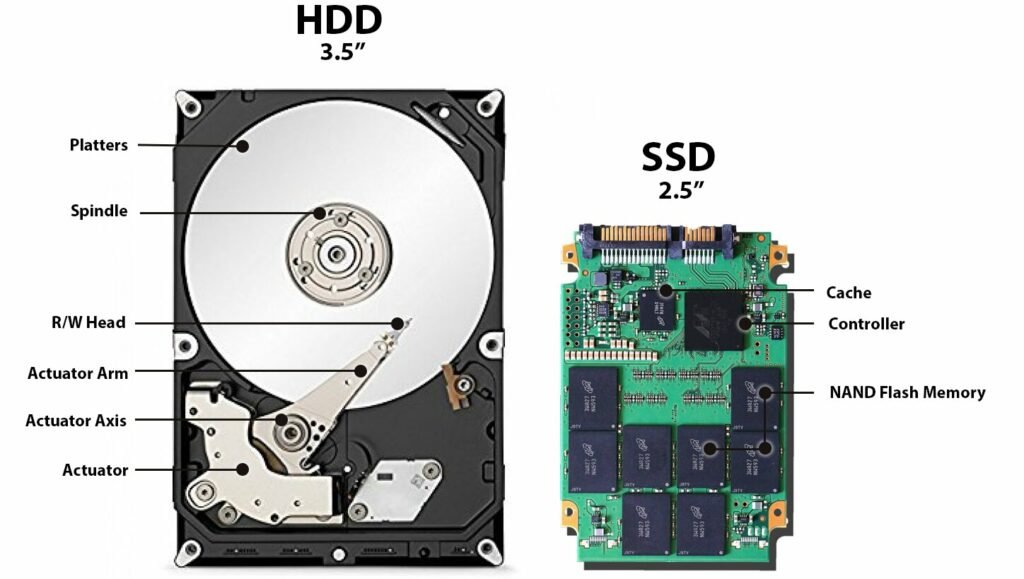
HDD vs SSD
Via: Medium
This has forever been the debate that is coming forward when it comes to buying external storage. What to buy? A portable Hard Disk or a portable SSD? And as with anything, the deal here is also relative to the use.
It totally depends that for what purpose you need an external storage device in the first place. You see, the portable hard disks are like the older version of external storage which are bulky, have moving parts, offer less storage. Because they have moving parts inside, they are can easily be damaged and suffer data loss if they fall or take some hit.
On the other hand, a portable SSD is a more new and reliable external storage medium. They are fast, reliable, offer more storage, have a fast transfer rate, and have no moving parts in them. So they can absorb a normal fall and you won’t lose your data.
The bottom line comes to the prices, portable HDDs are much cheap compared to portable SSDs and if you want portable SSDs with big storage, then it gets even more expensive.
So to solve the HDD vs SSD debate, you have to see what type of data you want to store in your external storage device. If you just have to keep a backup of files that you do not use often and just want to make a copy then go for an external HDD.
For example, if you just want to take a backup of your photos, and videos that you do not carry somewhere and have no need to transfer them, then you can just get a portable HDD, store your photos and videos, and keep them in a safe place.
But let’s say that if you are a creator who has to transfer a lot of content on daily basis and requires movement of external storage, then you should get a portable SSD that offers faster transfer speeds and is less prone to data loss.
For example, let’s say that you are a video editor. You will then need a fast external storage that could transfer data at good speed between your computer and the storage. So in this case you should definitely go for an external SSD.
Storage Capacity

Via: SeaGate
Selecting storage capacity is another thing in which people get confused. This is also one of the things that totally depends on your requirement.
If you just want to expand the storage for your old laptop, PC, then you can go with a mid-range external HDD. On the other hand, if you want an external storage device for data transfer from one place to another, I would suggest that you go for a 256 GB SSD and that will work great for you.
Also, if you want to get an external storage device for storing long term projects, or have a big backup, then it is ideal to get a 1TB SDD for that.
As of now, there are a lot of options when it comes to external storage devices as it ranges from 64GB to 2TB when it comes to SSDs and you can even get 5TB HDDs.
Transfer Speeds

Via: EverythingUSB.com
The transfer speed is also important when it comes to external storage devices. For daily usage, you want an external storage device with fast data transfer speed and in that case, SSDs are faster than HDDs.
Another thing that affects the transfer speed is the connecting interface of the external storage. Most of the drives use a USB interface nowadays and that is why it comes to generations. The old one in this case is USB 2.0 which has a maximum transfer speed of only 480Mbps. One should avoid external drives with a USB 2.0 connection interface.
Then you have USB 3.0, USB 3.1 Gen1, USB 3.2 Gen1. All of these are essentially the same and gave transfer speeds of up to 5Gbps.
USB-A is the most common connector and then you have USB-C. Some connectors use USB-C type connectors but they operate on Thunderbolt protocol and can offer up to 40Gbps of transfer speed.
So here is the hierarchy that you should follow, first look for external storage having a USB-C connector, if your computer doesn’t have USB-C or Thunderbolt, then you should go for USB 3.1/3.2 and then to USB 3.0. This hierarchy can be used with keeping your budget in mind as well.
Durability and Portability
In this area, the very obvious preference is SSDs as they are more compact and durable. They can take minor falls and you won’t have to worry much about data loss. Because of the compact size, they are more portable. Also, modern portable SSDs come with rugged cases that can protect them from accidental falls.
Security
Although, there are options to install encryption, and password protection software on your external storage device, people who care more about security, should look for the external storage drive with hardware encryption. This becomes very important if you store confidential data on your external storage drive.
Other Things to Keep in Mind
Some of the other things to keep in mind are, the additional features that you get. As some of the external storage drives offer USB charging feature, Wi-Fi connectivity, and other stuff. Also, keep in mind that external storage comes formatted for a particular OS out of the box.
For example, a Windows formatted external storage drive might have problems with iOS so keep that in mind too and select the external storage drive that is compatible with your device.
So that was all about the external storage buying guide. To conclude, SSDs are the way forward, although they are expensive but they offer faster speed and are more safe and durable. So you should go for an external portable SSD and the storage size totally depends on your use. Hope this external storage buying guide will help you.
Best Buy Deal
SAMSUNG T7 Portable SSD 1TB
Reads up to 1,050 MB/s / Writes up to 1,000 MB/s
USB 3.2 Gen2 and UASP Support
Shock-resistant (up to 6 Feets)
5 Best Wireless Car Charger Under $50
Printer Buying Guide: All You Need to Know
Television Buying Guide: All You Need to Know
Graphics Card Buying Guide: All You Need to Know
Laptop Buying Guide: Things to keep in mind before buying
Enjoyed this article?
If TechLatest has helped you, consider supporting us with a one-time tip on Ko-fi. Every contribution keeps our work free and independent.
Welcome to our buying guide special series, in this series we take you through the very basic and important options that you need to keep in mind before you head out to buy a gadget. In this edition, we are presenting you with a printer buying guide.
Yes, Printers are now very common because now they offer cool functionality and are more affordable. So, if you are planning to buy a printer make sure you keep these things in mind and read the complete printer buying guide here.
Printer Buying Guide
Don’t want to miss the best from TechLatest ? Set us as a preferred source in Google Search and make sure you never miss our latest.
The printer buying guide is important as, Over the past few years, the Pinter market is seeing a very intense competition between brands like HP, Epson , Brother , and Canon . This has made the prices drop down and companies have introduced some really cool features. So, it becomes a little confusing to select the right one. So here are some things to keep in mind. First of all, decide on what purpose you are going to buy a printer. It can be for personal use, for office purposes, or for something else, like in a shop or somewhere.
There are many types of printers that are available out there and they all serve different functionalities and let’s discuss them. And know some stuff about printers by this printer buying guide.
Type of Printers
Inkjet Printers
These are the most common and cheap printers available out there. The inkjet printers spray ink on paper to print photos and it uses ink that is stored in the cartridge. So, what’s wrong? Well, a lot of things.
First of all, the cartridges are very expensive and if you are a frequent user, you will have to buy them often. Second, The ink in the cartridge will dry if you will not use the printer regularly, the build quality is poor. It has low page yield and it will not print if any cartridge is missing. It’s a thing of the past, to be honest, and the only good thing is that it is cheap.
If you just print a few papers a week, only then you might consider it otherwise these types of printers are a big NO! and you will end up replacing them soon if you will buy the Inkjet printer.
Ink Tank Printers
Ink Tank printers are kind of new and better in the market and they are almost like the Inkjet printers, but these seem to have resolved the issue of expensive cartridge and low page yield.
These printers have an ink tank on the side that you can refill. So, if any of the colors goes out, you can refill it individually. These printers are great if you print a lot of stuff and initially, they might cost a little more, but these are very economical over time.
Ink Tank printers print better photos, have a high page yield, ink costs are lower compared to Inkjet printers. The only thing is that you don’t get new printheads every time you refill the ink. And the feeder tube clogs sometimes but these are not very big issues.
If you are a student or have a small local business, Ink Tank printers are a really great option for you as they will be more economical and useful for you.
Laser Printers
The laser printers work on a completely different mechanism, they use heated drums, toner to get the ink and stuff to work. The cartridge for this one is very expensive, but it evens out as the page yield is also very high.
The printers have a very high page yield, prints are fast, you have the option to replace cartridge individually, superb build quality, the good thing is that its ink won’t dry out if you will not use it for long. The downside is that photo printing is not that vibrant, and these printers are quite expensive.
Printing Cost
When it comes to printers, you need to see the long-term game. Just don’t fall for the cheap ones and then pay high amounts for cartridges. To give you an idea, in general printing a piece of paper from each type of printer will cost you as follows:
The lower end is for monochrome prints and the higher end is for colored prints.
As you can see the cheapest cost of printing a paper comes from Ink Tank printers, then Laser printers, and Inkjet are the most expensive.
Resolution
Printers have a thing called DPI and it is like pixels in displays. So more DPI means better quality of prints. Usually, 72DPI is ideal for monochrome prints and 150DPI for color prints. 300DPI is the recommended printing quality for Photos. The more high-quality prints you decide to generate, the more ink they will consume. So, it is also important to pay attention to DPI while printing and selecting a printer.
Speed
If you have a lot of stuff to print and distribute, then the printing speed is an important factor. If you print a lot of monochrome pages, just consider getting the Laser printers as they are very fast at printing while the Inkjet and Ink Tank printers are slow.
Paper Tray
Just see the number of papers a printer can hold, because if it less than the amount of paper you print daily, go for the printer with a bigger tray. It is important as you will be irritated if you have to fill papers again and again.
Added Functionality
Although the majority of the Ink Tank and Laser printers already have scanning and photo-copying support integrated to them, it is still important to keep in mind that you get the printer will scanning and photo-copying feature.
Some Other Things to Note
See for the wi-fi support in the printer. With wi-fi support, you will be able to print your photos wirelessly from your phone and PC and that is very useful functionality. And importantly, don’t fall for some fancy displays on printer, and some extra ports. These things just add up in cost and do not provide any good functionality.
- Graphics Card Buying Guide: All You Need to Know
- Television Buying Guide: All You Need to Know
- Graphics Card Buying Guide: All You Need to Know
Enjoyed this article?
If TechLatest has helped you, consider supporting us with a one-time tip on Ko-fi. Every contribution keeps our work free and independent.
