
Last updated: 29-Jan-2026: Updated all the Ghost Spectre Windows 11 download links.
Last updated: 20-Nov -2024: Added Ghost Spectre Windows 11 25H2 2025 update and updated all other download links.
Don’t want to miss the best from TechLatest ? Set us as a preferred source in Google Search and make sure you never miss our latest.
Last updated: 25-Sep-2024: Added Ghost Spectre Windows 11 24H2 2024 update and updated all other download links.
Last updated: 04-Nov-2023: Added Ghost Spectre Windows 11 23H2 2023 update and updated all other download links.
Updated on 12-Nov-2022 : The new Ghost Spectre Windows 11 22H2 SV2 (Official) release was added.
Microsoft the new Windows 11 for the general public last week, available via OTA as well as ISO files. Unfortunately, Microsoft is quite tough with the requirements for upgrading to Windows 11 and a ton of limitations.
Noting, nothing to worry about; there is always a solution to every problem, which applies here, too.
In this article, we are going to show you a decent Windows build named Ghost Spectre Windows 11 Superlite Version, in which they truncated many unnecessary features so that any PC can take advantage of Windows 11 without worrying about the update, RAM limitations, or an old HDD with limited speed.
Other Versions
- Ghost Spectre Windows 10 Superlite Version
- Ghost Spectre Windows 11 Home (25H2/24H2/23H2)
Content Table
Ghost Spectre Windows 11
Ghost Spectre Windows 11 Superlite is the modded version of the original Windows. Here, modded only doesn’t refer to extra features but also truncated useless features for a normal user.
Check out their YouTube Channel for more info: Ghost Spectre
Features:
- Improve DirectX12
- Compact Integrated + LZX (algorithm)
- Bloatware FREE!!
- Optimized Pagefile/Services/Scheduled/Search Indexer
- Privacy Optimizations & Performance Mode!
- Ghost Toolbox! (Add or Remove Windows Store and Much More!)
- Support any Other Language & Keyboard
- Support UWP Games / UWP Apps (ex. Forza/GOW/etc, etc)
- Updatable (can update to the latest build of Windows 11!)
- Window updates can be paused until 2077!
- With custom Icons, packs / Windows Themes pack!
- GHOST CUSTOM BOOTABLE! (WPE)
- Built-in TPM or Without TPM
Removable Options:
- Windows Apps And System Apps
- Windows Security/Defender/SmartScreen
- Remote Desktop/Tablet keyboard/NFC/Clipboard/Focus Assist – (Superlite only)
- Print Spooler (If you need printers, please set Auto in Services)
- OneDrive (can get it back using the ghost toolbox)
- Action Centre/Notifications – (Superlite Only)
- Telemetry – (Superlite Only)
- Error Reports – (Superlite Only)
- UAC (Never Notify)
- WinSxS backup
Screenshots:
Tap on the image for full view.
Download Ghost Spectre Windows 11 Superlite Version
25H2- 64-bit (Official Release)
- Edition: PRO SUPERLITE + SE + COMPACT + DEFENDER + W/O DEFENDER
- Build: 26200.7627
- Architecture: x64
- Language: en-US
- Size: 5.4 GB
- MD5 (iso): b3aafb1d6cf9809d5eac9cff424f5da3
- Downloads:
Note : Make sure to use an ad blocker after visiting these download mirrors for a smooth experience.
Password (if required): 25h2 Last Updated : 23-Jan-2026 Extract Tools : 7zip, WinRAR Download Tools : IDM, JDownloader2
NOTE : If you are installing from USB, make sure to disable Secure Boot in the BIOS beforehand to avoid boot issues.
Changelog
01/23/2026 – 25H2 | Official Release | UPDATE 3.2 Update OS 26200.7627 (Out-of-band) Update .NET Framework Update Startmenu for SE Improved Upgrade System for S/SE
12/18/2025 – 25H2 | Official Release | UPDATE 2 Update OS 26200.7462 Update .NET Framework Update Startmenu for SE Update AOMEI Partition Manager (Bootable) Update WinNTsetup (Bootable) Update CPU-Z (Bootable)
11/21/2025 – 25H2 | Official Release | UPDATE 1.2 Enabled the New Start Menu on the latest 25H2 build Fixed issue where other languages failed to download Updated Windows Setup to force upgrade on the same OS build (ISO)
11/19/2025 – 25H2 | Official Release | FIRST RELEASE Update OS 26200.7171 / 26200.6584 (FIRST-EDITION V1) Update .NET Framework Update Startmenu for SE Update Bootable / Winre Removed Cross Device Resume on S/SE ISO Based On The 25H2 Official Release (Consumer / October)
25H2- 64-bit (Official Release) (IoT ENT)
- Edition: IoT ENTERPRISE – SUPERLITE + SE + COMPACT + DEFENDER + W/O DEFENDER
- Build: 26200.7462
- Architecture: x64
- Language: en-US
- Size: 5.9 GB
- MD5 (iso): fb846c9d8e94c5e8938d963ec889f072
- Downloads:
Note : Make sure to use an ad blocker after visiting these download mirrors for a smooth experience.
Password (if required): 25h2 Last Updated : 23-Jan-2026 Extract Tools : 7zip, WinRAR Download Tools : IDM, JDownloader2
NOTE : If you are installing from USB, make sure to disable Secure Boot in the BIOS beforehand to avoid boot issues.
Important Notice : This release is not the LTSC variant of Windows IoT Enterprise .
Changelog
01/23/2026 – 25H2 | Official Release | UPDATE 3.2 Update OS 26200.7627 (Out-of-band) Update .NET Framework Update Startmenu for SE Update Bootable / Winre
12/18/2025 – 25H2 | Official Release | UPDATE 2 Update OS 26200.7462 Update .NET Framework Update Startmenu for SE Update AOMEI Partition Manager (Bootable) Update WinNTsetup (Bootable) Update CPU-Z (Bootable)
11/21/2025 – 25H2 | Official Release | UPDATE 1.2 Enabled the New Start Menu on the latest 25H2 build Fixed issue where other languages failed to download Updated Windows Setup to force upgrade on the same OS build (ISO)
11/19/2025 – 25H2 | Official Release | FIRST RELEASE Update OS 26200.7171 Update .NET Framework Update Startmenu for SE Update Bootable / Winre Removed Cross Device Resume on S/SE ISO Based On The 25H2 Official Release (Consumer / October)
24H2- 64-bit (Official Release)
- Edition: PRO SUPERLITE + SE + COMPACT + DEFENDER + W/O DEFENDER
- Build: 26100.6899
- Architecture: x64
- Language: en-US
- Size: 5 GB
- MD5 (iso): 4da53ee2e986534fd3a68c0129f6d539
- Downloads:
Password (if required): 24h2 Last Updated : 20-Oct-2025 Extract Tools : 7zip, WinRAR Download Tools : IDM, JDownloader2
Changelog
09/12/2025 – 24H2 | Official Release | UPDATE 19 OS Update: 26100.6899 / 26100.1742 (First-Edition-V13) Framework: Updated .NET Framework UI: Updated Startmenu for SE Recovery: Updated Windows Recovery Environment Drivers: Updated Bootable Driver (ISO) Expand: Ratio 2/5 16M /S
09/12/2025 – 24H2 | Official Release | UPDATE 19 OS Update: 26100.6584 / 26100.1742 (First-Edition-V12) Framework: Updated .NET Framework UI: Updated Startmenu for SE Recovery: Updated Windows Recovery Environment Drivers: Updated Bootable Driver (ISO)
08/27/2025 – 24H2 | Official Release | UPDATE 18-2 OS Update: 26100.4946 / 26100.1742 (First-Edition-V11) Framework: Updated .NET Framework UI: Updated Startmenu for SE Recovery: Updated Windows Recovery Environment Drivers: Updated Bootable Driver (ISO) Base: ISO based on Official 24H2 July Update Release (consumer) Fixed: Minor bugs
Having trouble extracting the ISO file? Check this GIF .
24H2- 64-bit (Official Release) (LTSC)
- Edition: ENT LTSC 2024 + IoT | SUPERLITE | SE | COMPACT | DEFENDER | W/O DEFENDER
- Build: 26100.6899
- Architecture: x64
- Language: en-US
- Size: 5 GB
- MD5 (iso): c457747dde9c6b14bc97ac7d9cb4d643
- Downloads:
Password (if required): 24h2 Last Updated : 20-Oct-2025 Extract Tools : 7zip, WinRAR Download Tools : IDM, JDownloader2
Changelog
10/20/2025 – 24H2 | Official Release | UPDATE 20 OS Update: 26100.6899 Framework: Updated .NET Framework UI: Updated Startmenu for SE Recovery: Updated Windows Recovery Environment Drivers: Updated Bootable Driver (ISO) Expand: Ratio 2/5 16M /S
09/12/2025 – 24H2 | Official Release | UPDATE 19 OS Update: 26100.6584 Framework: Updated .NET Framework UI: Updated Startmenu for SE Recovery: Updated Windows Recovery Environment Drivers: Updated Bootable Driver (ISO)
08/27/2025 – 24H2 | Official Release | UPDATE 18-3 OS Update: 26100.4946 Framework: Updated .NET Framework UI: Updated Startmenu for SE Drivers: Updated Bootable Driver (ISO) Fixed: Minor bugs
23H2- 64-bit (Official Release)
- Edition: PRO SUPERLITE + SE + COMPACT + DEFENDER + W/O DEFENDER
- Build: 22631.5909
- Architecture: x64
- Language: en-US
- Size: 4.5 GB
- MD5 (iso): 0fb8b321a4bed86b51e7e90365c6260a
- Downloads:
Password (if required): 23h2u23 Last Updated : 13-Sep-2025 Extract Tools : 7zip, WinRAR Download Tools : IDM, JDownloader2
Changelog
09/13/2025 – 23H2 | Official | UPDATE 23 Update OS 22631.5909 Update .NET Framework Update Startmenu for SE Update Bootable Driver (ISO)
08/28/2025 – 23H2 | Official | UPDATE 22-2 Update OS 22631.5771 Update .NET Framework Update Startmenu for SE Fixed minor bugs
07/16/2025 – 23H2 | Official | UPDATE 21 Update OS 22631.5624 Update .NET Framework Update Startmenu for SE Update Bootable Driver (ISO)
Having trouble extracting the ISO file? Check this GIF .
22H2- 64-bit (Official Release)
- Edition: PRO SUPERLITE + SE + COMPACT + DEFENDER + W/O DEFENDER
- Build: 22621.5909
- Architecture: x64
- Language: en-US
- Size: 4.5 GB
- MD5 (iso): 3cdd2e4aee7ddbfae8c78e1be2ccdf12
- Downloads:
Password (if required): 22h2u29 Last Updated : 13-Sep-2025 Extract Tools : 7zip, WinRAR
Having trouble extracting the ISO file? Check this GIF .
22H2 SV2 – 64-bit (Official Release)
- Edition: Superlite, Compact, Without Defender, With Defender
- Build: 22621.963
- Architecture: x64
- Language: en-US
- Size: 3.46 GB
- Downloads:
Password (if required): SV2GHOST1234U7 Last Updated : 19-Dec-2022
21H2 – 64-bit (Stable Build)
- Edition: Superlite, Compact, Without Defender, With Defender
- Build: 22000.194
- Architecture: x64
- Language: en-US
- Size: 3.00 GB
- Downloads:
21H2 – 64-bit (Stable Build)
- Edition: Superlite, Compact, Without Defender, With Defender
- Build: 22000.194
- Architecture: x64
- Language: en-US
- Size: 3.00 GB
- Downloads:
Changelog
- 10/10/2021 First Release of Windows 11
Install Ghost Spectre Windows 11
There isn’t anything new while installing Ghost Spectre Windows 10 Superlite Version on your PC. You are good to go if you are familiar with the normal clean installation steps.
Nevertheless, follow the below steps if you have any doubts about doing it:
Download Rufus to create the bootable media.
Open Rufus and create the bootable media by using the previously downloaded ISO File and a USB Drive.
Restart your PC, and while booting, before the Windows logo , tap the Boot Menu key to open it.
You see a screen with a list of drives, choose the one you inserted/plugged in , and hit Enter .
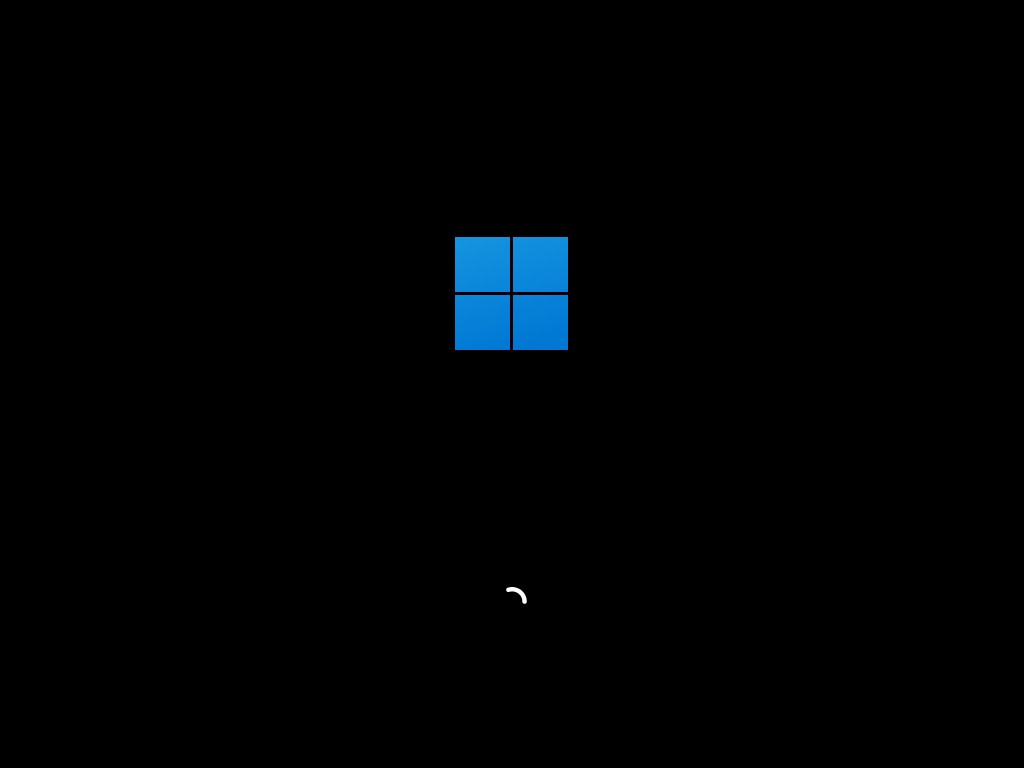
Then the Windows logo will appear on the screen for a while, if you see the animated dots it means everything is fine.
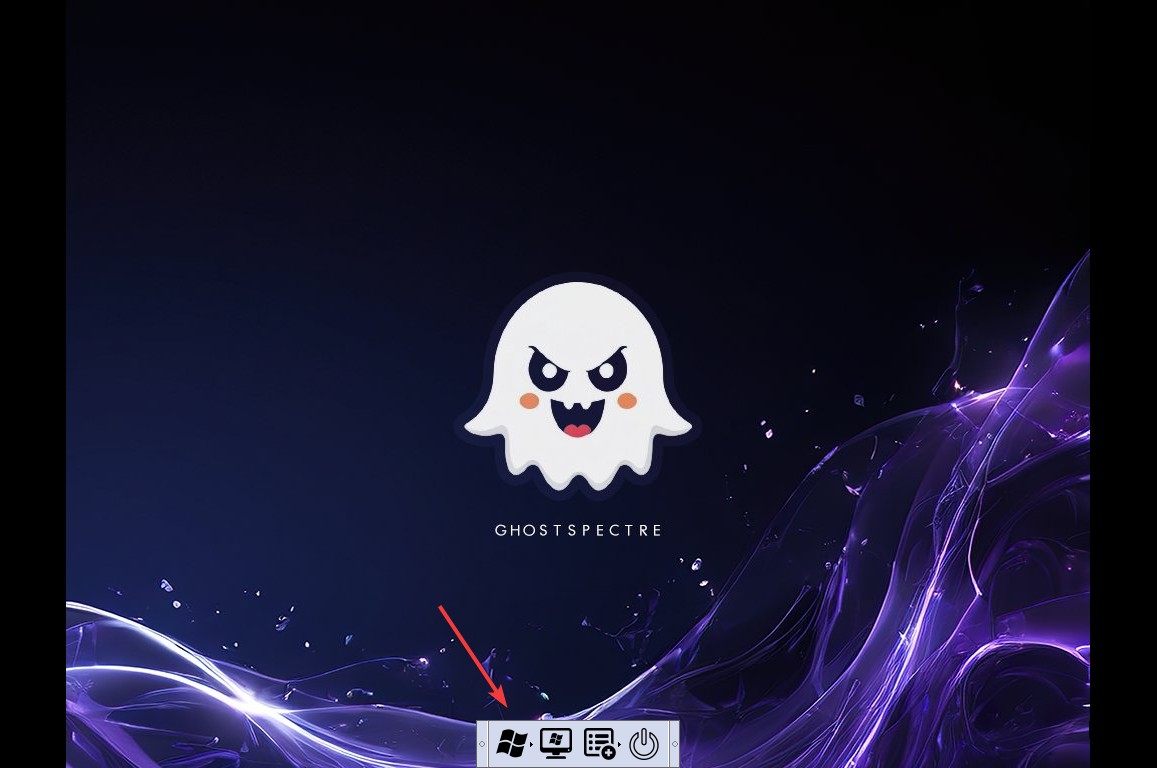
- Now, click on the Windows logo to start the Windows Setup steps.
- Next, you will be asked to select your Language, Time, and Keyboard method, and after configuring all these things, Click Next .

- On clicking the Next button, a new window will appear with different Ghost Spectre Windows 11 variants , select the one that suits you.

- Now, you will have to select the drive where you want to install the operating system.
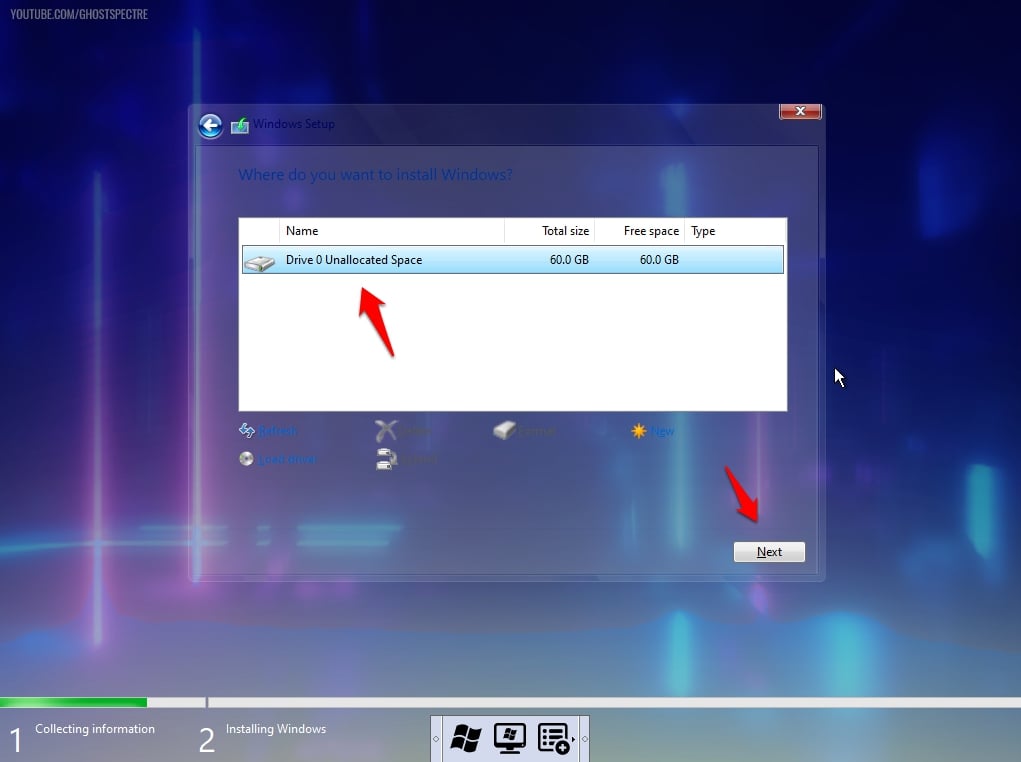
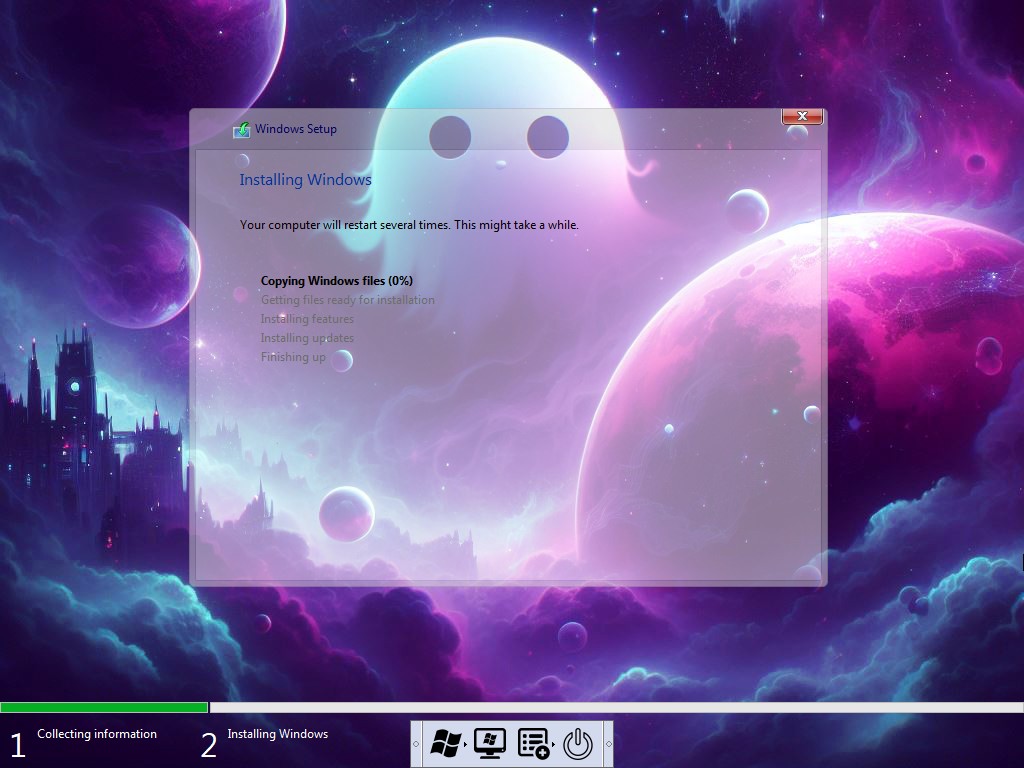
- And then, finally, click on the Next button to start the installation process.
- In a couple of minutes ( depending on memory and disk type), the OS will be installed successfully.
Can we use tablet mode in Windows 11 Ghost Spectre?
Yes, you can use it, but by default, it is disabled by the system; you can enable it by activating the 42 option from the Ghost Spectre toolbar.
How to use a printer in Ghost Spectre Windows 11?
You will have to make use of the Print Spooler from Ghost Toolbar.
Will it work with a 4 GB RAM PC?
It will absolutely work with your PC with 4 GB RAM.
What will happen to my Windows 10 license?
The license will be overridden and activated automatically by the new Ghost Spectre Windows 11, but to be on the safe side, we will suggest you extract Windows 10 license and save it somewhere.
Final Words – Ghost Spectre Windows 11 Superlite
That was it; we have gathered everything about the Ghost Spectre Windows 11 edition, download it and enjoy a perfect Windows 11 on your low-end PCs as well.
If I missed anything, please let us know in the comment section, and we will add it ASAP.
TechLatest, which includes domains *.techlatest.in and *.tech-latest.com, abides by 17 U.S.C. * 512 and the Digital Millennium Copyright Act (DMCA). Our approach involves promptly addressing infringement notices and undertaking necessary actions. Please note that we do not possess ownership of any content published in this article. If you find that your copyrighted material has been shared on our site and you desire its removal, kindly reach out to us through the provided contact information.
Enjoyed this article?
If TechLatest has helped you, consider supporting us with a one-time tip on Ko-fi. Every contribution keeps our work free and independent.
Last updated: 29-Jan-2026: Updated all the Ghost Spectre Windows 11 download links.
Last updated: 20-Nov -2024: Added Ghost Spectre Windows 11 25H2 2025 update and updated all other download links.
Don’t want to miss the best from TechLatest ? Set us as a preferred source in Google Search and make sure you never miss our latest.
Last updated: 25-Sep-2024: Added Ghost Spectre Windows 11 24H2 2024 update and updated all other download links.
Last updated: 04-Nov-2023: Added Ghost Spectre Windows 11 23H2 2023 update and updated all other download links.
Updated on 12-Nov-2022 : The new Ghost Spectre Windows 11 22H2 SV2 (Official) release was added.
Microsoft the new Windows 11 for the general public last week, available via OTA as well as ISO files. Unfortunately, Microsoft is quite tough with the requirements for upgrading to Windows 11 and a ton of limitations.
Noting, nothing to worry about; there is always a solution to every problem, which applies here, too.
In this article, we are going to show you a decent Windows build named Ghost Spectre Windows 11 Superlite Version, in which they truncated many unnecessary features so that any PC can take advantage of Windows 11 without worrying about the update, RAM limitations, or an old HDD with limited speed.
Other Versions
- Ghost Spectre Windows 10 Superlite Version
- Ghost Spectre Windows 11 Home (25H2/24H2/23H2)
Content Table
Ghost Spectre Windows 11
Ghost Spectre Windows 11 Superlite is the modded version of the original Windows. Here, modded only doesn’t refer to extra features but also truncated useless features for a normal user.
Check out their YouTube Channel for more info: Ghost Spectre
Features:
- Improve DirectX12
- Compact Integrated + LZX (algorithm)
- Bloatware FREE!!
- Optimized Pagefile/Services/Scheduled/Search Indexer
- Privacy Optimizations & Performance Mode!
- Ghost Toolbox! (Add or Remove Windows Store and Much More!)
- Support any Other Language & Keyboard
- Support UWP Games / UWP Apps (ex. Forza/GOW/etc, etc)
- Updatable (can update to the latest build of Windows 11!)
- Window updates can be paused until 2077!
- With custom Icons, packs / Windows Themes pack!
- GHOST CUSTOM BOOTABLE! (WPE)
- Built-in TPM or Without TPM
Removable Options:
- Windows Apps And System Apps
- Windows Security/Defender/SmartScreen
- Remote Desktop/Tablet keyboard/NFC/Clipboard/Focus Assist – (Superlite only)
- Print Spooler (If you need printers, please set Auto in Services)
- OneDrive (can get it back using the ghost toolbox)
- Action Centre/Notifications – (Superlite Only)
- Telemetry – (Superlite Only)
- Error Reports – (Superlite Only)
- UAC (Never Notify)
- WinSxS backup
Screenshots:
Tap on the image for full view.
Download Ghost Spectre Windows 11 Superlite Version
25H2- 64-bit (Official Release)
- Edition: PRO SUPERLITE + SE + COMPACT + DEFENDER + W/O DEFENDER
- Build: 26200.7627
- Architecture: x64
- Language: en-US
- Size: 5.4 GB
- MD5 (iso): b3aafb1d6cf9809d5eac9cff424f5da3
- Downloads:
Note : Make sure to use an ad blocker after visiting these download mirrors for a smooth experience.
Password (if required): 25h2 Last Updated : 23-Jan-2026 Extract Tools : 7zip, WinRAR Download Tools : IDM, JDownloader2
NOTE : If you are installing from USB, make sure to disable Secure Boot in the BIOS beforehand to avoid boot issues.
Changelog
01/23/2026 – 25H2 | Official Release | UPDATE 3.2 Update OS 26200.7627 (Out-of-band) Update .NET Framework Update Startmenu for SE Improved Upgrade System for S/SE
12/18/2025 – 25H2 | Official Release | UPDATE 2 Update OS 26200.7462 Update .NET Framework Update Startmenu for SE Update AOMEI Partition Manager (Bootable) Update WinNTsetup (Bootable) Update CPU-Z (Bootable)
11/21/2025 – 25H2 | Official Release | UPDATE 1.2 Enabled the New Start Menu on the latest 25H2 build Fixed issue where other languages failed to download Updated Windows Setup to force upgrade on the same OS build (ISO)
11/19/2025 – 25H2 | Official Release | FIRST RELEASE Update OS 26200.7171 / 26200.6584 (FIRST-EDITION V1) Update .NET Framework Update Startmenu for SE Update Bootable / Winre Removed Cross Device Resume on S/SE ISO Based On The 25H2 Official Release (Consumer / October)
25H2- 64-bit (Official Release) (IoT ENT)
- Edition: IoT ENTERPRISE – SUPERLITE + SE + COMPACT + DEFENDER + W/O DEFENDER
- Build: 26200.7462
- Architecture: x64
- Language: en-US
- Size: 5.9 GB
- MD5 (iso): fb846c9d8e94c5e8938d963ec889f072
- Downloads:
Note : Make sure to use an ad blocker after visiting these download mirrors for a smooth experience.
Password (if required): 25h2 Last Updated : 23-Jan-2026 Extract Tools : 7zip, WinRAR Download Tools : IDM, JDownloader2
NOTE : If you are installing from USB, make sure to disable Secure Boot in the BIOS beforehand to avoid boot issues.
Important Notice : This release is not the LTSC variant of Windows IoT Enterprise .
Changelog
01/23/2026 – 25H2 | Official Release | UPDATE 3.2 Update OS 26200.7627 (Out-of-band) Update .NET Framework Update Startmenu for SE Update Bootable / Winre
12/18/2025 – 25H2 | Official Release | UPDATE 2 Update OS 26200.7462 Update .NET Framework Update Startmenu for SE Update AOMEI Partition Manager (Bootable) Update WinNTsetup (Bootable) Update CPU-Z (Bootable)
11/21/2025 – 25H2 | Official Release | UPDATE 1.2 Enabled the New Start Menu on the latest 25H2 build Fixed issue where other languages failed to download Updated Windows Setup to force upgrade on the same OS build (ISO)
11/19/2025 – 25H2 | Official Release | FIRST RELEASE Update OS 26200.7171 Update .NET Framework Update Startmenu for SE Update Bootable / Winre Removed Cross Device Resume on S/SE ISO Based On The 25H2 Official Release (Consumer / October)
24H2- 64-bit (Official Release)
- Edition: PRO SUPERLITE + SE + COMPACT + DEFENDER + W/O DEFENDER
- Build: 26100.6899
- Architecture: x64
- Language: en-US
- Size: 5 GB
- MD5 (iso): 4da53ee2e986534fd3a68c0129f6d539
- Downloads:
Password (if required): 24h2 Last Updated : 20-Oct-2025 Extract Tools : 7zip, WinRAR Download Tools : IDM, JDownloader2
Changelog
09/12/2025 – 24H2 | Official Release | UPDATE 19 OS Update: 26100.6899 / 26100.1742 (First-Edition-V13) Framework: Updated .NET Framework UI: Updated Startmenu for SE Recovery: Updated Windows Recovery Environment Drivers: Updated Bootable Driver (ISO) Expand: Ratio 2/5 16M /S
09/12/2025 – 24H2 | Official Release | UPDATE 19 OS Update: 26100.6584 / 26100.1742 (First-Edition-V12) Framework: Updated .NET Framework UI: Updated Startmenu for SE Recovery: Updated Windows Recovery Environment Drivers: Updated Bootable Driver (ISO)
08/27/2025 – 24H2 | Official Release | UPDATE 18-2 OS Update: 26100.4946 / 26100.1742 (First-Edition-V11) Framework: Updated .NET Framework UI: Updated Startmenu for SE Recovery: Updated Windows Recovery Environment Drivers: Updated Bootable Driver (ISO) Base: ISO based on Official 24H2 July Update Release (consumer) Fixed: Minor bugs
Having trouble extracting the ISO file? Check this GIF .
24H2- 64-bit (Official Release) (LTSC)
- Edition: ENT LTSC 2024 + IoT | SUPERLITE | SE | COMPACT | DEFENDER | W/O DEFENDER
- Build: 26100.6899
- Architecture: x64
- Language: en-US
- Size: 5 GB
- MD5 (iso): c457747dde9c6b14bc97ac7d9cb4d643
- Downloads:
Password (if required): 24h2 Last Updated : 20-Oct-2025 Extract Tools : 7zip, WinRAR Download Tools : IDM, JDownloader2
Changelog
10/20/2025 – 24H2 | Official Release | UPDATE 20 OS Update: 26100.6899 Framework: Updated .NET Framework UI: Updated Startmenu for SE Recovery: Updated Windows Recovery Environment Drivers: Updated Bootable Driver (ISO) Expand: Ratio 2/5 16M /S
09/12/2025 – 24H2 | Official Release | UPDATE 19 OS Update: 26100.6584 Framework: Updated .NET Framework UI: Updated Startmenu for SE Recovery: Updated Windows Recovery Environment Drivers: Updated Bootable Driver (ISO)
08/27/2025 – 24H2 | Official Release | UPDATE 18-3 OS Update: 26100.4946 Framework: Updated .NET Framework UI: Updated Startmenu for SE Drivers: Updated Bootable Driver (ISO) Fixed: Minor bugs
23H2- 64-bit (Official Release)
- Edition: PRO SUPERLITE + SE + COMPACT + DEFENDER + W/O DEFENDER
- Build: 22631.5909
- Architecture: x64
- Language: en-US
- Size: 4.5 GB
- MD5 (iso): 0fb8b321a4bed86b51e7e90365c6260a
- Downloads:
Password (if required): 23h2u23 Last Updated : 13-Sep-2025 Extract Tools : 7zip, WinRAR Download Tools : IDM, JDownloader2
Changelog
09/13/2025 – 23H2 | Official | UPDATE 23 Update OS 22631.5909 Update .NET Framework Update Startmenu for SE Update Bootable Driver (ISO)
08/28/2025 – 23H2 | Official | UPDATE 22-2 Update OS 22631.5771 Update .NET Framework Update Startmenu for SE Fixed minor bugs
07/16/2025 – 23H2 | Official | UPDATE 21 Update OS 22631.5624 Update .NET Framework Update Startmenu for SE Update Bootable Driver (ISO)
Having trouble extracting the ISO file? Check this GIF .
22H2- 64-bit (Official Release)
- Edition: PRO SUPERLITE + SE + COMPACT + DEFENDER + W/O DEFENDER
- Build: 22621.5909
- Architecture: x64
- Language: en-US
- Size: 4.5 GB
- MD5 (iso): 3cdd2e4aee7ddbfae8c78e1be2ccdf12
- Downloads:
Password (if required): 22h2u29 Last Updated : 13-Sep-2025 Extract Tools : 7zip, WinRAR
Having trouble extracting the ISO file? Check this GIF .
22H2 SV2 – 64-bit (Official Release)
- Edition: Superlite, Compact, Without Defender, With Defender
- Build: 22621.963
- Architecture: x64
- Language: en-US
- Size: 3.46 GB
- Downloads:
Password (if required): SV2GHOST1234U7 Last Updated : 19-Dec-2022
21H2 – 64-bit (Stable Build)
- Edition: Superlite, Compact, Without Defender, With Defender
- Build: 22000.194
- Architecture: x64
- Language: en-US
- Size: 3.00 GB
- Downloads:
21H2 – 64-bit (Stable Build)
- Edition: Superlite, Compact, Without Defender, With Defender
- Build: 22000.194
- Architecture: x64
- Language: en-US
- Size: 3.00 GB
- Downloads:
Changelog
- 10/10/2021 First Release of Windows 11
Install Ghost Spectre Windows 11
There isn’t anything new while installing Ghost Spectre Windows 10 Superlite Version on your PC. You are good to go if you are familiar with the normal clean installation steps.
Nevertheless, follow the below steps if you have any doubts about doing it:
Download Rufus to create the bootable media.
Open Rufus and create the bootable media by using the previously downloaded ISO File and a USB Drive.
Restart your PC, and while booting, before the Windows logo , tap the Boot Menu key to open it.
You see a screen with a list of drives, choose the one you inserted/plugged in , and hit Enter .
Then the Windows logo will appear on the screen for a while, if you see the animated dots it means everything is fine.
- Now, click on the Windows logo to start the Windows Setup steps.
- Next, you will be asked to select your Language, Time, and Keyboard method, and after configuring all these things, Click Next .
- On clicking the Next button, a new window will appear with different Ghost Spectre Windows 11 variants , select the one that suits you.
- Now, you will have to select the drive where you want to install the operating system.
- And then, finally, click on the Next button to start the installation process.
- In a couple of minutes ( depending on memory and disk type), the OS will be installed successfully.
Can we use tablet mode in Windows 11 Ghost Spectre?
Yes, you can use it, but by default, it is disabled by the system; you can enable it by activating the 42 option from the Ghost Spectre toolbar.
How to use a printer in Ghost Spectre Windows 11?
You will have to make use of the Print Spooler from Ghost Toolbar.
Will it work with a 4 GB RAM PC?
It will absolutely work with your PC with 4 GB RAM.
What will happen to my Windows 10 license?
The license will be overridden and activated automatically by the new Ghost Spectre Windows 11, but to be on the safe side, we will suggest you extract Windows 10 license and save it somewhere.
Final Words – Ghost Spectre Windows 11 Superlite
That was it; we have gathered everything about the Ghost Spectre Windows 11 edition, download it and enjoy a perfect Windows 11 on your low-end PCs as well.
If I missed anything, please let us know in the comment section, and we will add it ASAP.
TechLatest, which includes domains *.techlatest.in and *.tech-latest.com, abides by 17 U.S.C. * 512 and the Digital Millennium Copyright Act (DMCA). Our approach involves promptly addressing infringement notices and undertaking necessary actions. Please note that we do not possess ownership of any content published in this article. If you find that your copyrighted material has been shared on our site and you desire its removal, kindly reach out to us through the provided contact information.
Enjoyed this article?
If TechLatest has helped you, consider supporting us with a one-time tip on Ko-fi. Every contribution keeps our work free and independent.
