
Screen mirroring is meant to make our work and presentations easier—no cables, no hassle, just instant sharing from your device to a bigger screen. But anyone who has relied on it in a critical moment knows the truth: it often fails when you need it most.
Whether it’s connection issues, lag, or device incompatibility, these problems disrupt meetings, derail lessons, and frustrate remote teams.
Don’t want to miss the best from TechLatest ? Set us as a preferred source in Google Search and make sure you never miss our latest.
In this article, we’ll break down what screen mirroring really is, why it so often lets us down, and when it simply isn’t enough for today’s fast-paced work environments.
More importantly, we’ll explore how CZUR StarryHub , a smart meeting room solution, offers a more reliable alternative, especially in high-stakes settings like corporate boardrooms, classrooms, and hybrid meetings.
Content Table
What is Screen Mirroring?
Screen mirroring technology operates by forming a wireless link between a source device, such as an Android phone, iPhone, smartphone , or laptop, and a receiving device like a TV or projector.
Essentially, the source device transmits a wireless signal that carries the screen’s content, which the receiving device then detects and accepts. After receiving the signal, the receiving device decodes it and projects the mirrored content onto its screen.
This exchange happens continuously, enabling real-time replication of the source device’s display. Today, most screen mirroring solutions rely on protocols like Wi-Fi Direct or Miracast to facilitate this direct device-to-device connection.

Why Does Screen Mirroring Often Fail, and How Can It Be Solved?
While screen mirroring offers great convenience for sharing content, it frequently runs into issues during real-world use, especially among iPhone users. Below are some common causes of screen mirroring not working and practical solutions:
Common Reasons:
- Unstable Network Connection : Poor or unreliable Wi-Fi can cause lag, freezing, or dropped connections during mirroring.
- Device Incompatibility : Some TVs or projectors may not support iPhone’s AirPlay or other mirroring protocols.
- Screen Mirroring Not Enabled : If the feature hasn’t been turned on or configured properly, the devices won’t connect.
- Privacy Restrictions : Features like Screen Time may block mirroring attempts.
- Outdated Software or System : Using older versions of iOS or outdated TV firmware may result in compatibility issues.
- Bluetooth Interference : Bluetooth connections can sometimes interfere with Wi-Fi performance, disrupting the mirroring process.
How to Fix It:
- Enable Screen Mirroring : Open the Control Center on your iPhone, tap “Screen Mirroring” or “AirPlay,” and select the correct receiving device.
- Check Device Compatibility : Make sure your TV or projector supports screen mirroring, especially Apple’s AirPlay protocol if using an iPhone.
- Restart Your Devices : Restart both your iPhone and the receiving device to clear any temporary glitches.
- Improve Network Connection : Ensure your Wi-Fi is stable and has sufficient bandwidth. Reboot the router or move closer to the access point if needed.
- Turn Off Screen Time : Disable the Screen Time feature to remove any restrictions on sharing your screen.
- Disable Bluetooth : If you experience unstable connections, try turning off Bluetooth and reattempting the mirroring process.
- Update Your iPhone : Make sure your iPhone is running the latest iOS version to ensure compatibility and optimal performance.
When Screen Mirroring Just Isn’t Enough?
While screen mirroring is useful for basic tasks, like playing a video or showing a few photos, it often falls short in more demanding collaboration scenarios.
Here are situations where screen mirroring simply isn’t enough:
- No Support for Multi-Screen Collaboration : Most screen mirroring solutions only allow one device to connect at a time, making it inefficient and awkward to switch between presenters or participants.
- Lag Reduces Productivity : When displaying high-resolution videos or animations, latency issues can disrupt the flow and hurt the overall experience.
- No Integration with Cameras or Audio Input : Traditional screen mirroring only transmits visuals, lacking the integration of cameras, microphones, and other devices needed for hybrid meetings or interactive sessions.
- Limited Control and Interaction : Only the source device has control during mirroring, making it difficult to enable collaborative editing, live feedback, or shared interactions.
In fast-paced work environments, modern classrooms, or hybrid meeting setups, these limitations can lead to inefficiency, miscommunication, and even a poor professional impression.
If your workflow demands smoother collaboration, higher stability, and more powerful interactivity, screen mirroring alone may no longer be enough.

CZUR StarryHub: A More Reliable Alternative to Screen Mirroring
While screen mirroring works for simple content sharing, it often fails to deliver the stability and functionality required in multi-device collaboration, frequent presenter switching, or hybrid work environments.
That’s where CZUR StarryHub comes in. As an all-in-one smart conference projection system, StarryHub isn’t just a projector with screen mirroring, it reimagines the entire experience of content sharing and meeting collaboration from the ground up.
What Makes CZUR StarryHub Better?
- Stable Wireless Casting – Say goodbye to lag and dropped signals, even with multiple devices connected simultaneously.
- FHD 1080p Display – Clear, sharp visuals for charts, documents, and media to enhance presentation impact.
- Built-in OS & Apps – Open files, play videos, or run slideshows directly—no laptop required.
- Split-Screen Mode – Share multiple screens at once for better comparison and teamwork.
- Integrated Smart Cameras – Auto-focus on the speaker or shared content, ideal for hybrid meetings.
Unlike traditional mirroring methods that depend on network strength and protocol compatibility, CZUR StarryHub creates a dedicated, optimized collaboration environment, boosting efficiency and reliability across every session.
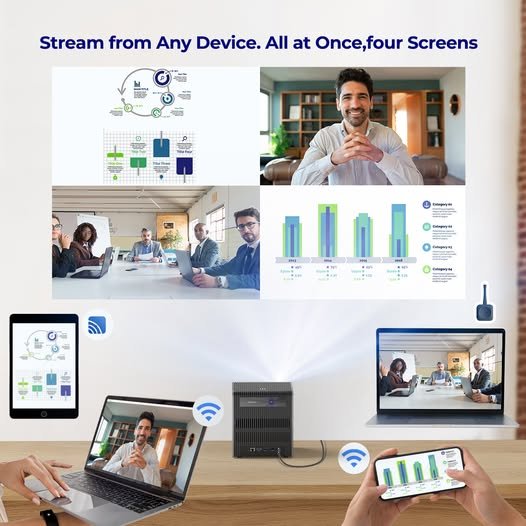
CZUR StarryHub Use Case Scenarios
Corporate Meeting Rooms
Common problems with traditional mirroring: device incompatibility, unstable connections, and screen delays disrupt the meeting flow.
How StarryHub helps:
- Instant presentation setup with no pairing delay
- Seamless device switching for multiple participants
- Split-screen mode enhances content comparison and collaboration
Classroom Presentations
Common issues: switching between teacher and student devices often leads to errors or disconnections; only one screen can be shared at a time, reducing interactivity.
StarryHub advantages:
- Quick screen switching between teachers and students
- Dual/multi-screen display for real-time comparison or collaboration
- Compatibility with educational apps for more engaging learning
Global Remote Meetings
The hybrid work challenge: Remote attendees often miss key content due to poor video quality, lag, or limited interaction.
How StarryHub enhances hybrid collaboration:
- Built-in cameras, mics, and speakers ensure clear communication
- Split view shows both the presenter and the content simultaneously
- Auto-framing keeps the focus on what matters most to remote attendees
Conclusion
Screen mirroring has undoubtedly made everyday content sharing much more convenient. Whether you’re casting a movie from your phone or giving a simple presentation, it usually gets the job done.
However, when you’re dealing with more complex scenarios, like multi-person meetings, multi-device collaboration, or remote teamwork, the limitations of screen mirroring become much more apparent.
That’s when a more professional, stable, and efficient solution is needed, like CZUR StarryHub . It’s a tool designed to make content sharing and meeting collaboration more reliable in critical situations.
Enjoyed this article?
If TechLatest has helped you, consider supporting us with a one-time tip on Ko-fi. Every contribution keeps our work free and independent.
