Highlights
- With the chatbot spreading across platforms, the ChatGPT hype won’t go away any time soon.
- Through the web browser on your iPhone or through third-party messaging apps that integrate with ChatGPT, you can use ChatGPT on your Apple Watch.
- Luckily, we have some easy steps using which you can also add ChatGPT to your Apple watch.

This smartwatch has many features, including messaging, a phone number, fitness tracking, and much more.
In contrast, users now enjoy a more personalized and interactive Apple Watch experience thanks to ChatGPT, an advanced AI chatbot developed by OpenAI.
Don’t want to miss the best from TechLatest ? Set us as a preferred source in Google Search and make sure you never miss our latest.
This article will explore how you can add ChatGPT on Apple Watch. But what is ChatGPT? Why do we add ChatGPT to your Apple Watch? Let’s find out further in this article.
Content Table
What is ChatGPT?

Photo byOm siva PrakashonUnsplash
ChatGPT is an artificial intelligence chatbot created by OpenAI. It uses a GPT (Generative Pre-Trained Transformer) model, a deep learning algorithm capable of producing human-like text using patterns learned from large data.
In addition to understanding natural language inputs, ChatGPT can have human-like conversations with users. You can ask questions, get recommendations, and engage in casual conversations with it.
With extensive training, ChatGPT can provide information on current events, science, history, and entertainment.
Using ChatGPT, you can personalize conversations by taking into account past interactions and inputs from the user. In response to previous conversations, it is able to tailor its responses accordingly.
Why add ChatGPT to your Apple Watch?
With ChatGPT, users can communicate with an AI-powered chatbot that takes natural language queries into account and responds accordingly.
In addition to providing insights, recommendations, and suggestions on various topics, it can provide useful information on a variety of topics, such as health, fashion, entertainment, and others.
You can enhance your Apple Watch experience by using ChatGPT to manage daily tasks and activities in a more interactive and personalized manner.
Steps to Add and Use ChatGPT on Apple Watch
Step 1: Install the OpenAI App
In order to add ChatGPT to your Apple Watch, you must first install the OpenAI app on your iPhone. Here are the directions you need to follow:
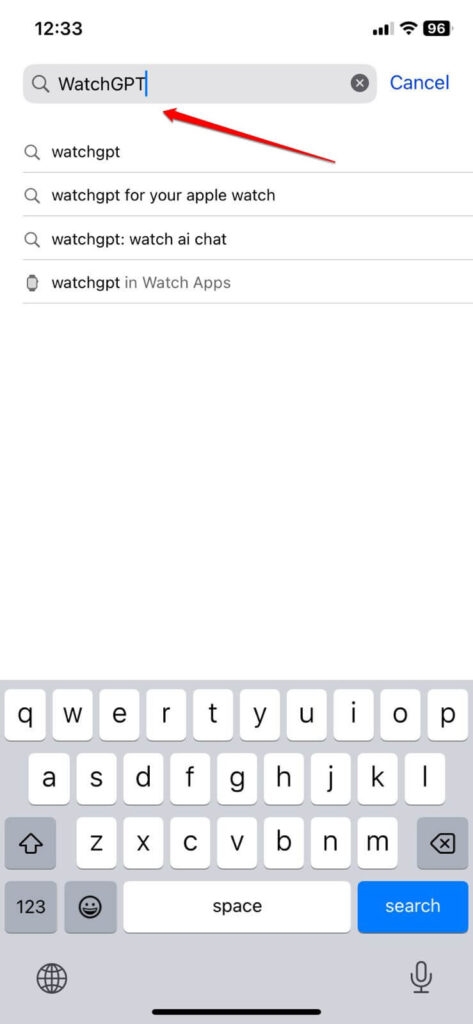
- Open the App Store on your iPhone.
- Enter “WatchGPT” or “Petey-AI Assistant” in the search box.
- Finally, click “Get” to download and install the app.
Step 2: Connect the OpenAI App to Your Apple Watch
You must connect your Apple Watch to your iPhone once you have installed the OpenAI app. Here are the guidelines you need to follow:
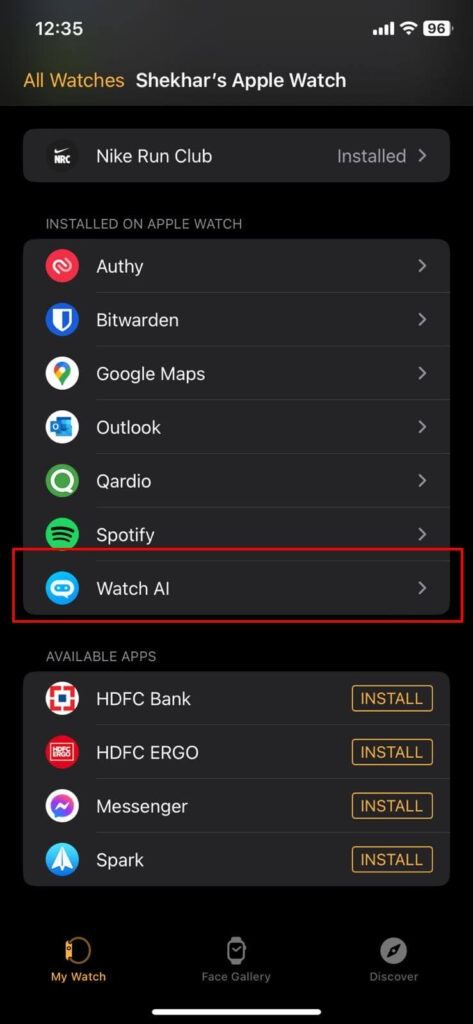
- Firstly, you need to open the Watch app on your iPhone.
- Look for the WatchGPT or Petey app in the “Available Apps” or “Installed on Apple Watch” section.
- Ensure the toggle for “Show App on Apple Watch” is enabled in the Petey app.
- On your iPhone, open the Petey app.
- Tap on the “ChatGPT” option.
- Follow the on-screen instructions to sign up for the service.
Step 4: Start Chatting with ChatGPT
Using ChatGPT on your Apple Watch is easy once you’ve signed up. This can be accomplished by following the steps below:
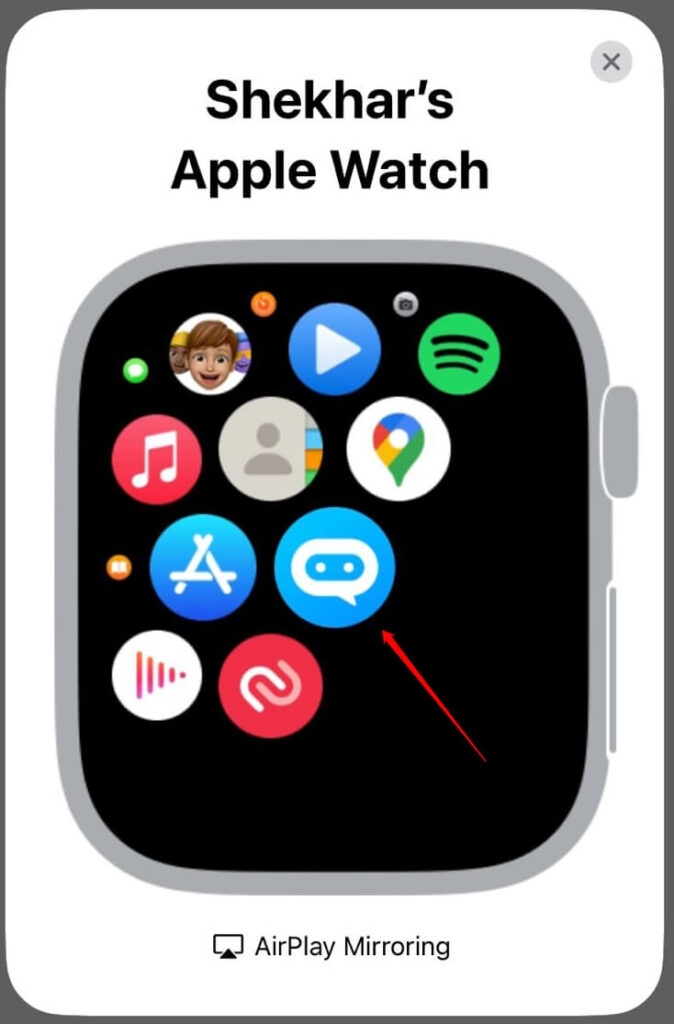
- Launch the Petey ChatGPT app on your Apple Watch.
- Click on the Ask me anything input field.
- Whether you use Scribble or voice dictation, give a prompt.
- Click Done.
- It will take a few moments for the app to return an answer.
- If you’d like to share your result with someone, choose Share.
- You can return to the prompt input screen if you select Done instead. However, you can ask ChatGPT any question or query, and it will provide you with a relevant answer.
Tips for Using ChatGPT on Your Apple Watch
- Keep your questions short and precise: ChatGPT works best when questions are short and precise. It is best to avoid complex and lengthy sentences in order to avoid confusing the AI.
- Be specific: If you have a question, be sure to include specific details. You might mention the location, cuisine, and budget of the restaurant you are looking for.
- Experiment with different queries: ChatGPT provides useful insights on a wide range of topics. Therefore, don’t be afraid to experiment with different queries in order to explore their potential.
- Use dictation: You can ask ChatGPT a question using dictation on your Apple Watch if you find typing difficult. You can speak your question by pressing and holding the microphone icon on the keyboard.
Conclusion – ChatGPT on Apple Watch
When you add ChatGPT to your Apple Watch, it will enhance your day-to-day task management and activity management experience by creating a more personalized and interactive experience.
So, that’s all we have for you. We hope that you find this article helpful. For more info, comment below and let our team know.
Further Reading:
- Fix: Apple Watch Stuck on Apple Logo
- Best Tactical Apple Watch Bands (Military Style)
- Here’s How Can You Get Snapchat on Apple Watch (Series 6 and 7)
Enjoyed this article?
If TechLatest has helped you, consider supporting us with a one-time tip on Ko-fi. Every contribution keeps our work free and independent.
