Highlights
- A lot of Spotify users (696M active monthly listeners) were eagerly waiting for the lossless audio quality.
- Spotify announced it last month on September 10, 2025; it was previously knows as Spotify HiFi
- It is rolling out globally in more than 50 countries in batches and will be available for all by October end.
Don’t want to miss the best from TechLatest ? Set us as a preferred source in Google Search and make sure you never miss our latest.
Some users reported that they received the notification from the Spotify app on their smartphone that lossless audio is coming soon to your account. And some users said that they got the access even without any notification.
Read : 5 Reasons You Shouldn’t Consider Buying Nothing Headphone 1
Follow the guide till the last to enable lossless audio in Spotify and enjoy the immersive & ultra-high-quality music on your smartphone.
Content Table
How to Enable Lossless Audio in Spotify
The steps are straightforward; you just need to follow these 3-4 steps, and you are good to go:
- Open the Spotify app either on your iPhone or Android.
- Tap on your name icon or profile pic located at the top-left corner.
- And then select Settings and privacy .
- Now, you are on the settings page; tap on the Media quality sub-settings.
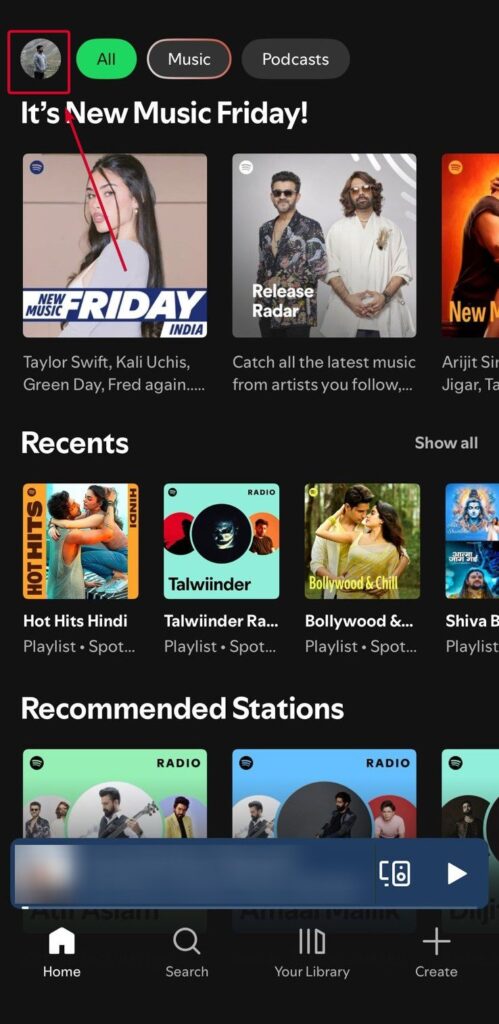
Image Credit: Shekhar/TechLatest
- You will see two streaming quality options: Wi-Fi streaming quality and Cellular streaming quality .
- Under each, you can select Lossless (Up to 1GB/hr, Up to 24-bit/44.1kHz • FLAC)
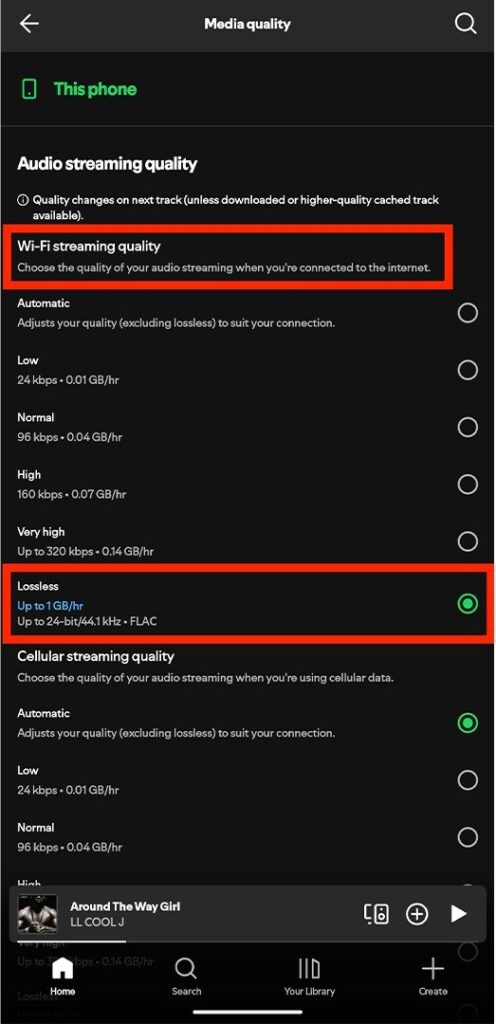
Image Credit: Tshaka/Android Central
Before discussing anything, let’s first check the number:
- Spotify : up to 24-bit/44.1kHz • FLAC
- Apple Music : up to 24-bit/192kHz • ALAC
- Amazon Music Unlimited : up to 24-bit/192kHz • FLAC
- Tidal : up to 24-bit/192kHz • FLAC
- Deezer : up to 16-bit/44.1kHz • FLAC
At this moment, Spotify has the highest numbers in terms of monthly active listeners, but in terms of quality, Spotify is providing the worst quality music experience.
Read : 12 Cool Tech Gadgets You Must Buy
Should you enable Spotify lossless audio feature?
Well, yes, “something is better than nothing”; this quote fits here perfectly, although Spotify isn’t providing the superior quality if we compare it to other providers, but it is still better than listening in low quality ( Very High – Up to 320kbps).
Note that once you enable the lossless audio feature on Spotify, you will be burning a lot more data than earlier. The very high quality on Spotify uses only 0.14 GB per hour, whereas lossless quality will use up to 1 GB per hour of listening.
Featured Image: Photo by Fath on Unsplash
Enjoyed this article?
If TechLatest has helped you, consider supporting us with a one-time tip on Ko-fi. Every contribution keeps our work free and independent.
