
Here, in this article, we are going to show you the steps with which you will be able to Join a Google Meet session from Gmail without any problem.
The world’s leading brand, tech giant Google announces that their video-conferencing product Google meet is now free for everyone. During this pandemic, this step by Google is momentous and highly appreciable. In this lockdown, we all get to know about the power of video meetings, either it is working from home/ sharing our work with teammates/ discussing the projects over video conferencing, or it is spending time with loved ones, learning from home. Video meeting is the best and convenient option to stay safe and productive.
Join a Google Meet Session from Gmail
- Open your favorite browser and navigate to Gmail .
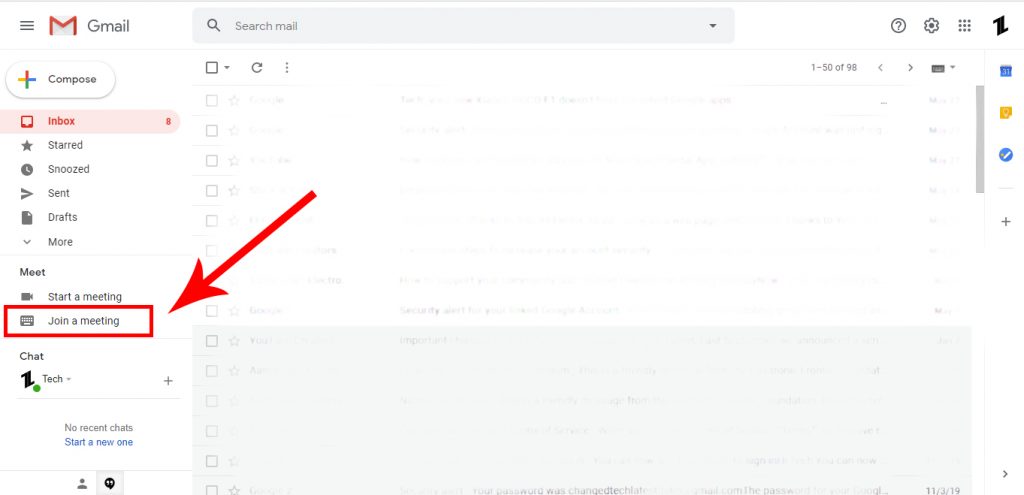
- Find the “Meet” section in the bottom left corner of your screen.
- Click “Join a meeting.”
- Enter the code supplied by the meeting initiator. This code will be the string of letters and dashes at the end of the meeting URL. (ex: fyi-hdsc-sfz)
- Again, if this is your first-time using Meet, you may have to grant it permission to access your computer’s camera and microphone.
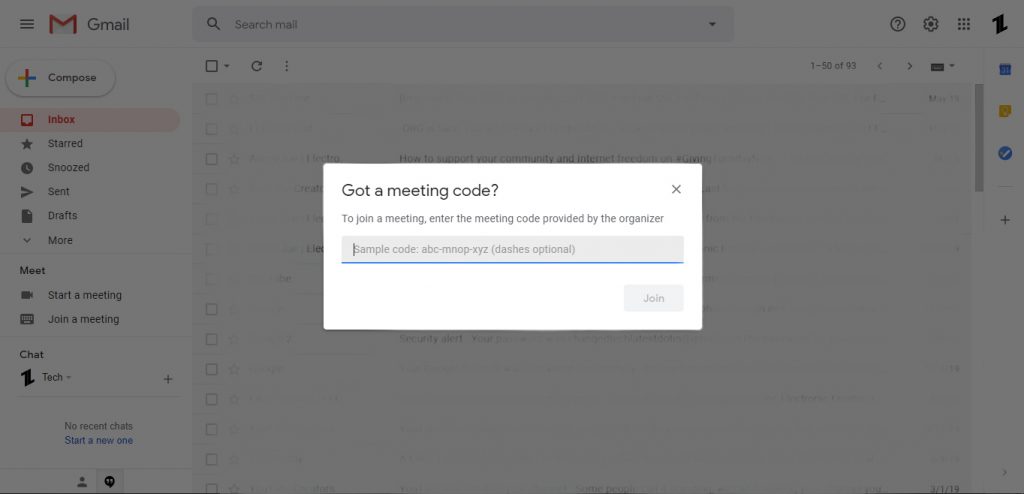
- That’s it! You’ve successfully joined a meeting in progress.
Don’t want to miss the best from TechLatest ? Set us as a preferred source in Google Search and make sure you never miss our latest.
That was it, this was the easiest way to Join a Google Meet session from Gmail. I hope you find it informative.
- How to Start a Google Meet Session from Gmail
- Google Meet is Now Free; Here Is How to Join Meeting Using it
- Google Integrating Messaging Services In Stadia
- How to Blur Background While Video Conferencing
Enjoyed this article?
If TechLatest has helped you, consider supporting us with a one-time tip on Ko-fi. Every contribution keeps our work free and independent.
