Highlights
- Whether it be watching reels or viewing unwanted messages, there are situations where users want to read messages without letting others know.
- Unlike WhatsApp or other platforms, there’s no option to turn off read receipts on Instagram.
- You would be looking for how to see Instagram messages without opening them, and we have 100% Working methods for it.

Do you want to read the messages someone sent to you on DM without letting them know?
We all like to chat with our Instagram friends and followers on Instagram through DM. While talking about many things, we often come across situations when we don’t want to reply to someone.
Don’t want to miss the best from TechLatest ? Set us as a preferred source in Google Search and make sure you never miss our latest.
To make it sound not rude, it is better not to let them know you read their message. But there is no feature on IG where you can read DMs without letting the other person know.
This article will tell you how to read Instagram Messages without opening them. At the same time, you will learn about third-party party applications that can be used for this purpose.
Content Table
How to See Instagram Messages Without Opening?
There is no direct option to remove the read receipts option on IG. But we have listed five other ways to enable you to see Instagram messages without opening them.
Method 1: Read on Instagram DM by Reading Notifications
Do you read Messages in notifications?
If so, you can start doing that for Instagram too. So, our first way in this list to read a DM without opening it is by reading notifications.
Instagram notifications will inform you if there are any DMs on it. Also, it will show the DM message and the sender’s name immediately when you open your phone. So, you can swipe it down to read the DM.
However, be careful because it can even open your DM immediately if you click the notification. So, make sure you carefully read the message without any clicks.
Although it is a helpful method, it is not commonly used because you will get to read only a few words or the first line. So, to read long messages without opening them, you can use other methods.
If you have not enabled Instagram notifications on your device, you can use the following methods:
- Download the Instagram App on your phone.
- Go to the notifications or apps option in Settings.
- Search Instagram and enable the notifications for Instagram.
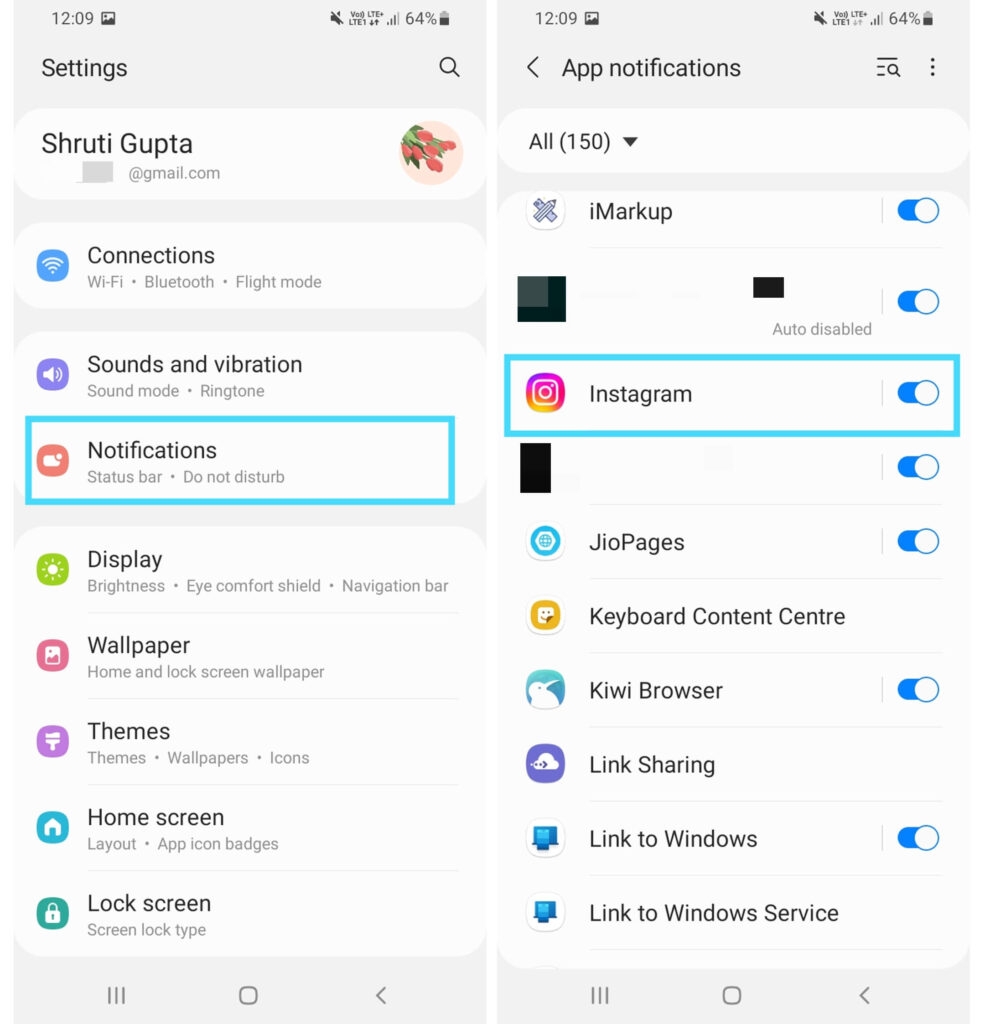
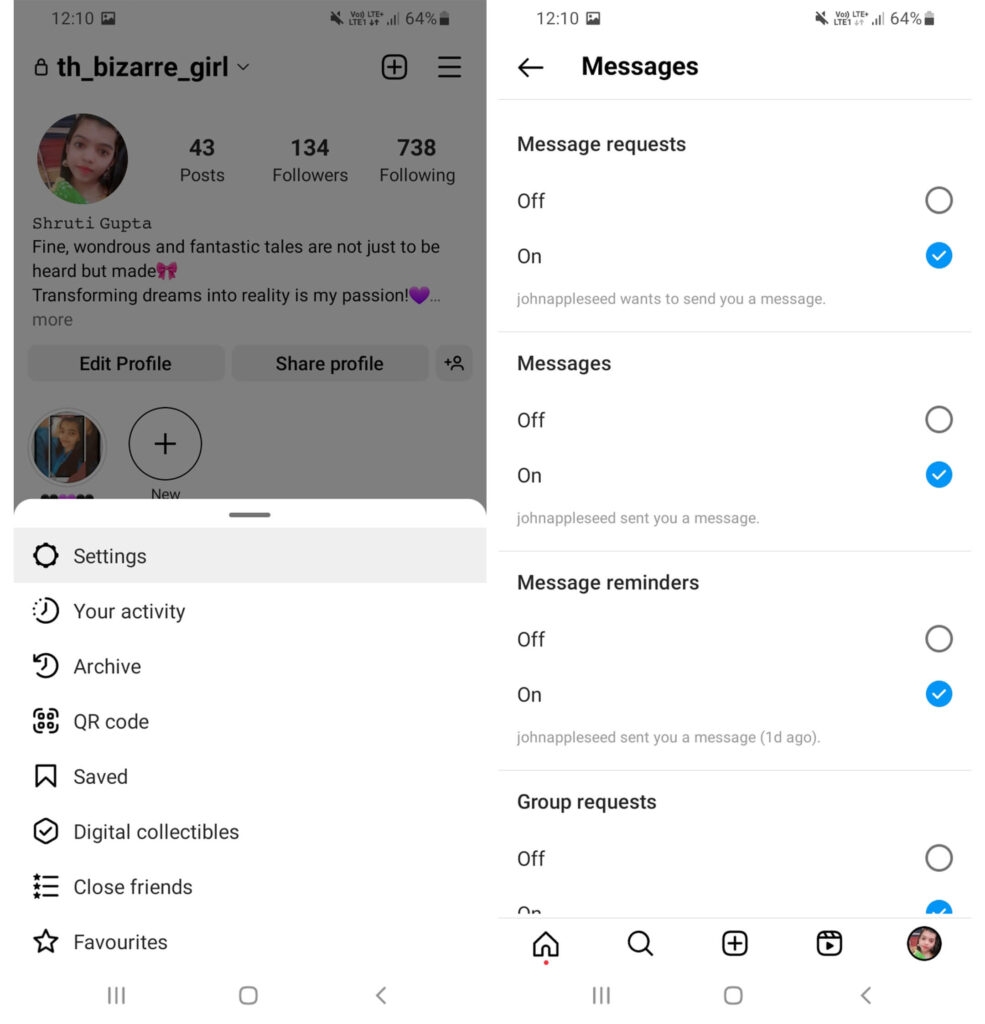
- Further, also go to your profile on Instagram.
- Tap on the three-lined icon and go to Settings.
- Navigate to notifications, tap on Messages, and see whether they are on or not.
Thus, you can read the message, but checking the full-fledged long becomes difficult. In such a case, the following method will help you!
Method 2: Restrict the Sender’s Account
Have you ever tried restricting any sender account on Instagram?
It implies that you can read the IG messages of someone without letting them know in the message requests section. You will have to remove that account from the restricted section for replying to message requests.
Use the following steps to restrict an account on Instagram:
- Open the Instagram app on your device.
- Go to the IG profile of the user you want to restrict.
- Click on the three dots at the corner of their profile and select the Restrict option and confirm it
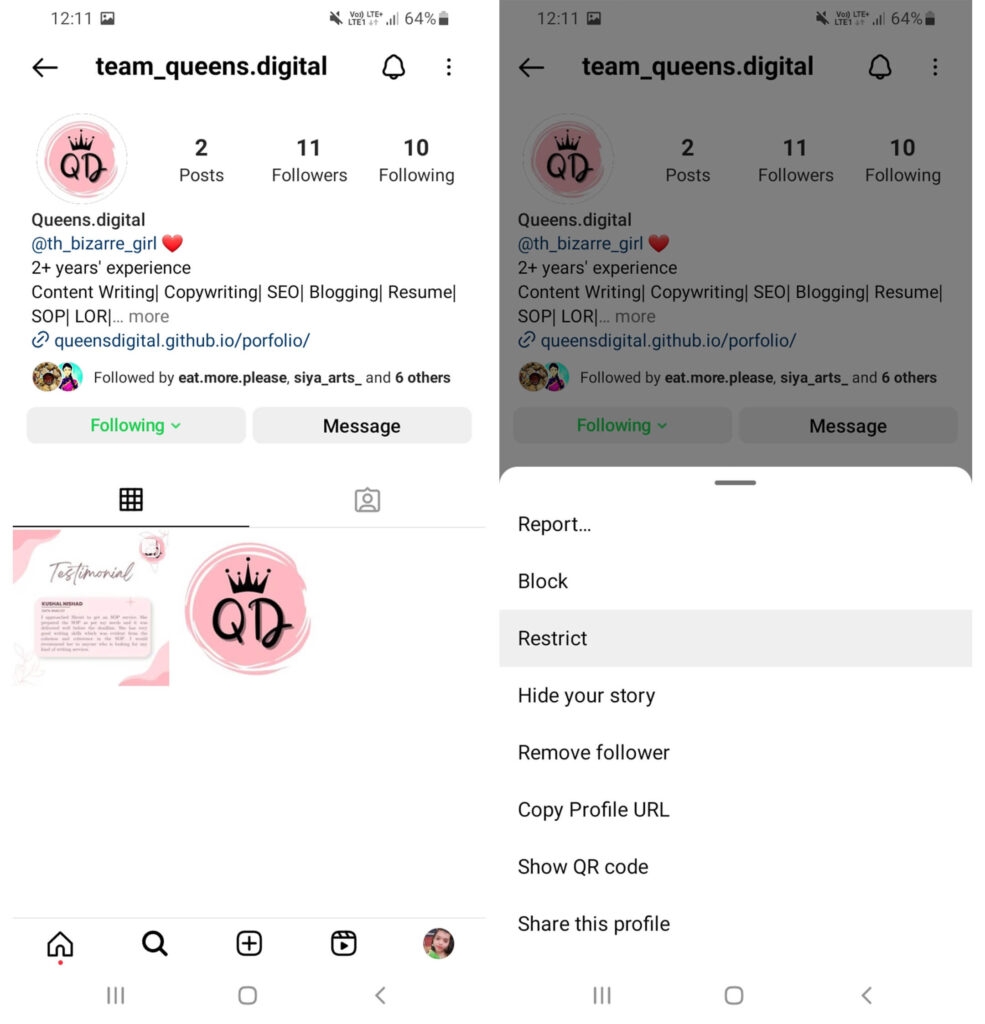
Thus, you can successfully see messages, but it does open them. However, they won’t know that you have read them.
Method 3: View Messages in Emails
Like reading messages through notifications, you can view the IG messages via email. You can read Instagram DMs through email notifications sent to your IG-linked email ID. Consequently, the other person won’t get to know about it.
For it, you can access Instagram and select to receive message notifications via email. So, Instagram will send you to your registered email address and receive notifications about it.
Method 4: Read DM Without Turning On The Internet
When you fully receive the message and haven’t opened it, you can turn to know the method and then read it.
However, it has one drawback: once you enable the mobile data, the read receipt will be sent to the other person.
So, you can use this method if you don’t want to temporarily send the ‘read receipt’ option.
Firstly, enable your internet and receive all the latest messages on Instagram. Secondly, disable your mobile data and then open the Instagram DM section.
Once you put off your data, it won’t send the read receipt command. So, the other person won’t get the ‘seen’ update.
Use the following steps for this method:
- Download and open the Instagram app on your device.
- Go to the Instagram feed and put on the mobile data to get new messages.
- Turn off the internet and read the message.
- Turn on your mobile data when you want the read receipt command to be sent.
Moreover, if this method isn’t helpful, the following would help!
Method 5: Use Airplane Mode
You can use airplane mode, like disabling the internet to read Instagram Messages. As we know, Airplane mode turns off your device’s Wifi and mobile data, which will help you read Instagram messages without opening them.
First, open the Instagram app and go to your DMs. But don’t select the chat you don’t want to be marked as read. It helps to load new messages when your wifi and data are off.
So, once messages are loaded using airplane mode, you can take a look and read them. Consequently, when you are willing to use the ‘seen’ option, you can turn off airplane mode and the internet.
After understanding the different methods to read Instagram Messages without opening, let’s Know about third-party apps for this purpose.
Top 2 Apps to Read Instagram DMs Without Letting Others Know
When the above methods seem complex to implement, or they seem ineffective, then you can use third-party apps. Several let you do, so we have covered you with the top 2 ones!
1.Unseen
How about an app that can help you read messages without being seen on multiple social media platforms?
Unseen is a particular ‘no seen’ app. You can read Messages on any social media account without being visible as ‘seen.’ So, you can scroll through your unread messages without letting anyone know.
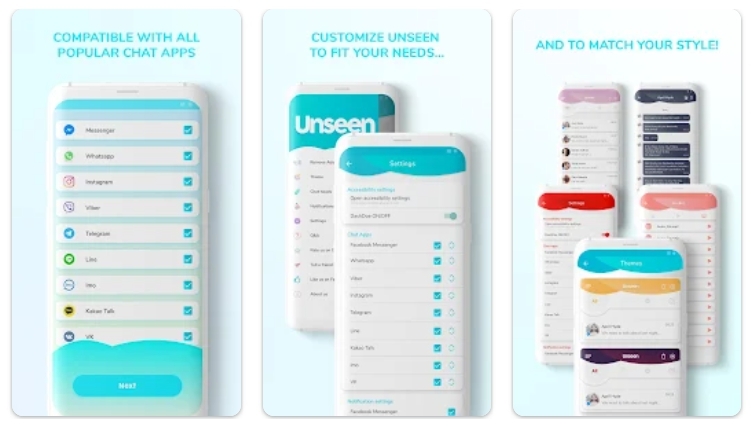
It supports social media apps like Instagram, Whatsapp, messenger, video, and Telegram.
2.AirDroid Parental Control
How about an app that will let you read IG messages on another device without being seen?
Airdroid Parental Control is a game blocker and GPS tracker. It helps parents remotely monitor their kids’ devices. It has screen time control, app blocking, instant alerts, and screencasting. So, the Screencast fast can be helpful.
You can install this app on another device or phone and remotely read your Instagram messages without being seen. But be careful to ensure no one else accesses and reads your message through that.
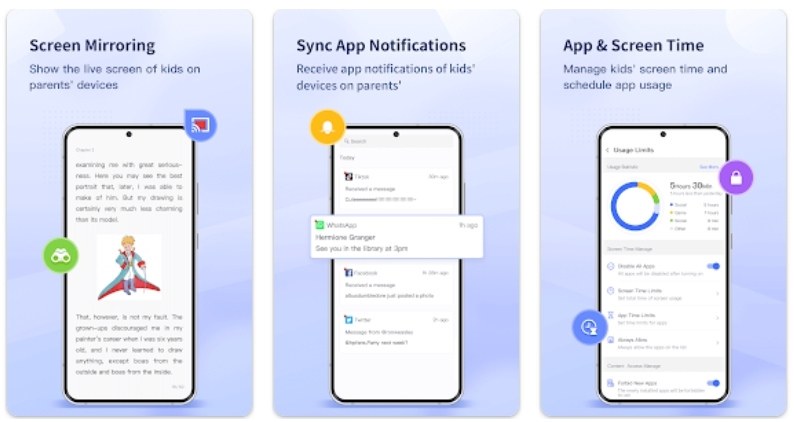
These two third-party apps can read your Instagram messages without opening or sending a read receipts command.
Does IG offer a Read receipts Option?
Unlike WhatsApp or other social media sites, Instagram offers no read receipts option. So, you cannot put it off to prevent others from seeing that you opened it. Consequently, after sending a message, there will be seen written under it. So, the read receipt will indicate that you read a message.
Can you read Instagram Messages without being seen?
Although Instagram has no direct option to off the read receipts command, you can use several other ways to read Instagram Messages without being seen. These include reading the messages through Notifications, restricting the sender’s account, and seeing DM without turning on the internet or using airplane mode. Further, you can also view messages via Email.
Can you turn off reading on Instagram DM?
There is no option to disable the read receipts on Instagram. So, when you open a DM, the sender gets a ‘seen’ command visible under it to know that it’s read.
What is vanish mode on Instagram chat?
The vanish mode on Instagram can send disappearing content on Instagram chats. It can be messages, photos, videos, and other content. When you get a message or media in vanish mode, it disappears when you leave the chat.
Wrapping Up – See Instagram Messages Without Opening
We have reached the end of this article, and you will have learned the different ways to read an Instagram message without opening it.
So, you can read the messages in Notifications or emails or restrict the other user’s account to reading their messages without sending the read receipt command. Y
ou can even read without turning on your internet. So, you know what to do the next time you want to read a message without opening or letting another person know.
Further Reading:
- How to Snooze Someone on Facebook?
- How to Find Trending Audio on Instagram?
- How to Turn Off Suggested Posts on Instagram?
Enjoyed this article?
If TechLatest has helped you, consider supporting us with a one-time tip on Ko-fi. Every contribution keeps our work free and independent.
