
According to reports, Instagram is home to nearly 1 billion active users, and this makes Instagram one of the biggest platforms of social media.
Don’t want to miss the best from TechLatest ? Set us as a preferred source in Google Search and make sure you never miss our latest.
Instagram likes are one of the most happening features of Instagram. The like button was made by Instagram to appreciate and support an Instagram post. It is represented by a red heart icon and is nearly as old as Instagram.

Photo byPrateek KatyalonUnsplash
Content Table
Everything about the like feature on Instagram
If you have been using Instagram for a while now, it can become a little difficult for you to keep a record of all the posts that you have liked over a given period. Fortunately, Instagram understands this and provides its users with the history logs of the posts they have liked.
Now users can have a view of all the photos of their previous life in chronological order. These old likes can be used as potential bookmarks for future references for you to use for fun.
In this article, we’ll show you step-by-step ways by which you can have a list of all the Instagram posts you have previously liked on Instagram on Android and IOS apps. Also, we’ll include steps to do this process on the Instagram website itself.
Why is the option to see a like post on Instagram so handy?
All the posts that you like on Instagram or might appreciate–can be pressed a LIKE.
Once you like the post, it is saved in the Instagram app activity, and you can visit it again in case you want to see it later. The option to see Instagram-liked posts stores all your important posts in one place for you.
Yes, it will allow you to make a catalog-like thing of all the new accounts that you’ve followed and the stories that you like. Therefore, with the like button, all your desired posts will be marked in one place and not just this.
In case you want to unlike of photo, normally you would have to find that photo again across endless searches. With the liked posts feature, you can get the history log of all the posted of previously liked and things will get smoother for you.
Steps to See Liked Posts on Instagram Using the Android app
The option to view previously liked posts on Instagram is well included in the mobile apps. let’s start with the procedure you have to follow to see liked posts on the Instagram Android app.
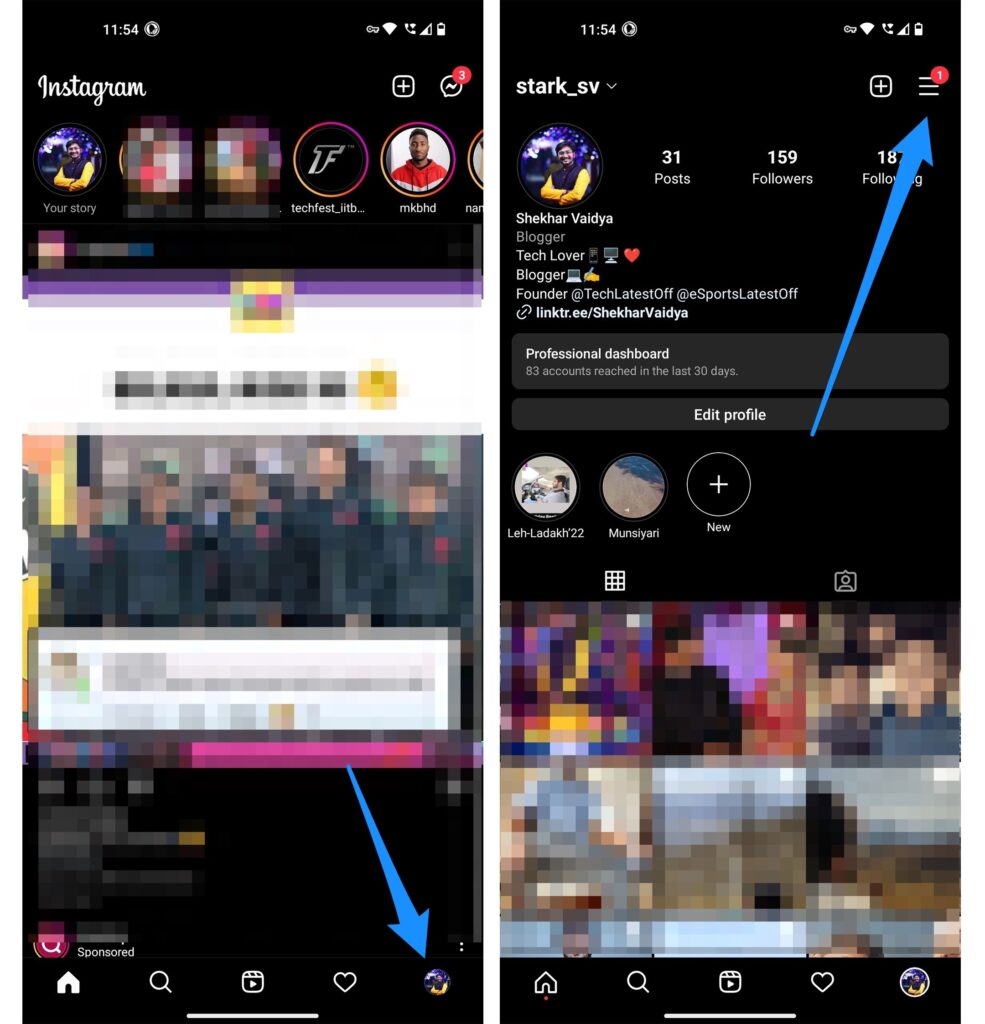
- First, download and open the Instagram app and go to your profile tab located in the bottom right corner.
- Look for the Instagram profile tab, and there you see horizontal lines, also called hamburger located on the top left of your screen.
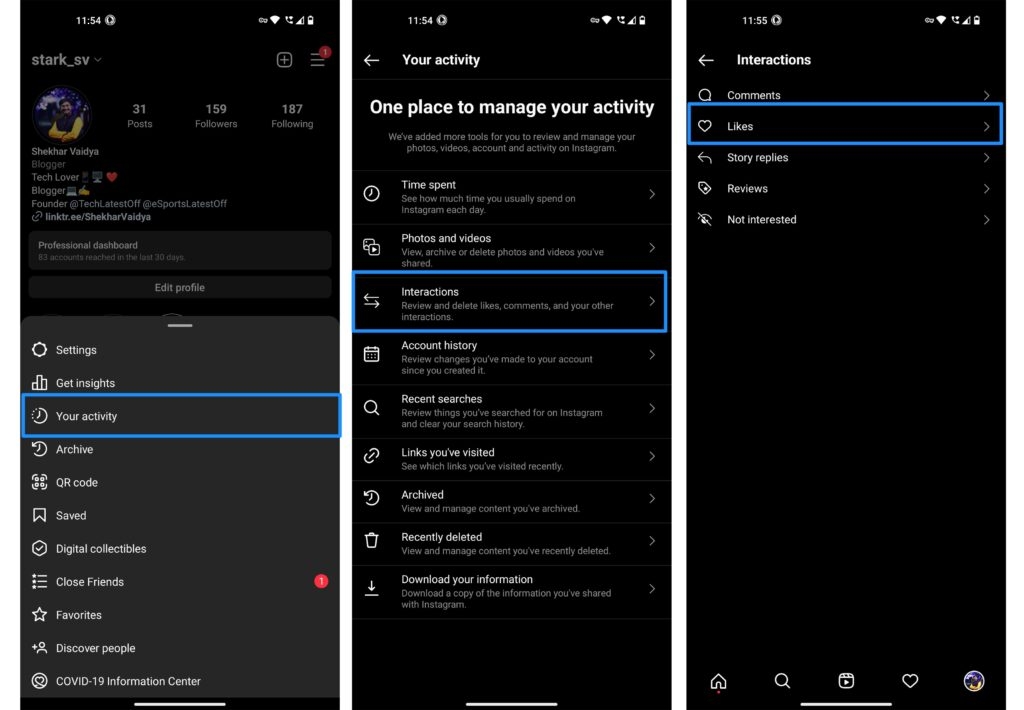
- Tap on your activity and then select interactions .
- Finally, you will see an option for Likes; click on it. Once you do that, you will find an entire history of all the Instagram posts, whether it’s reels, videos, or images–everything you have ever liked since you join Instagram.
Steps to See Liked Posts on Instagram if You are an iOS user
The process is almost similar to android.
Let’s go through the steps to check your likes on the posts by the Instagram iOS app.
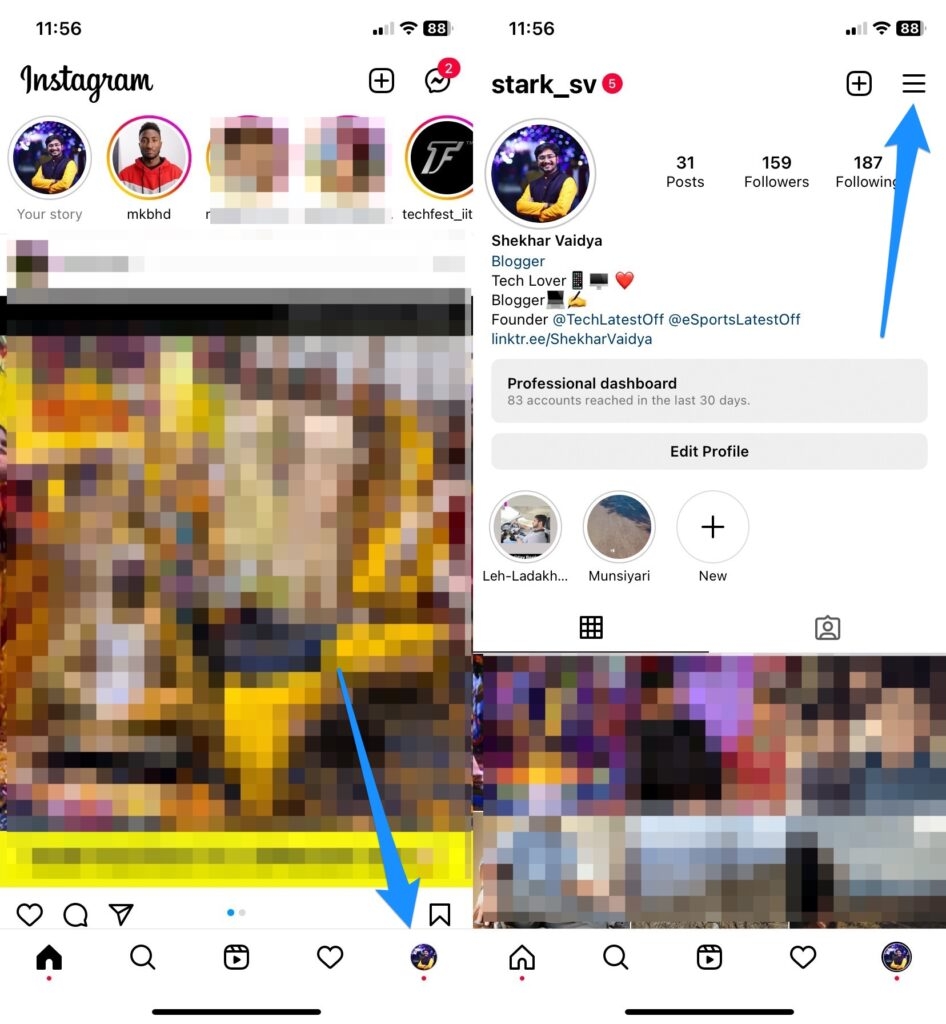
- Open the Instagram app on your phone and go to the profile section which is located on the bottom bridge of the screen.
- Within the profile section, you will find the three lines which are also known as the hamburger button. As we know, they will be present on the top left.
- On it, you see the option your activity , tap it and then click on the interactions option.
- Open likes.
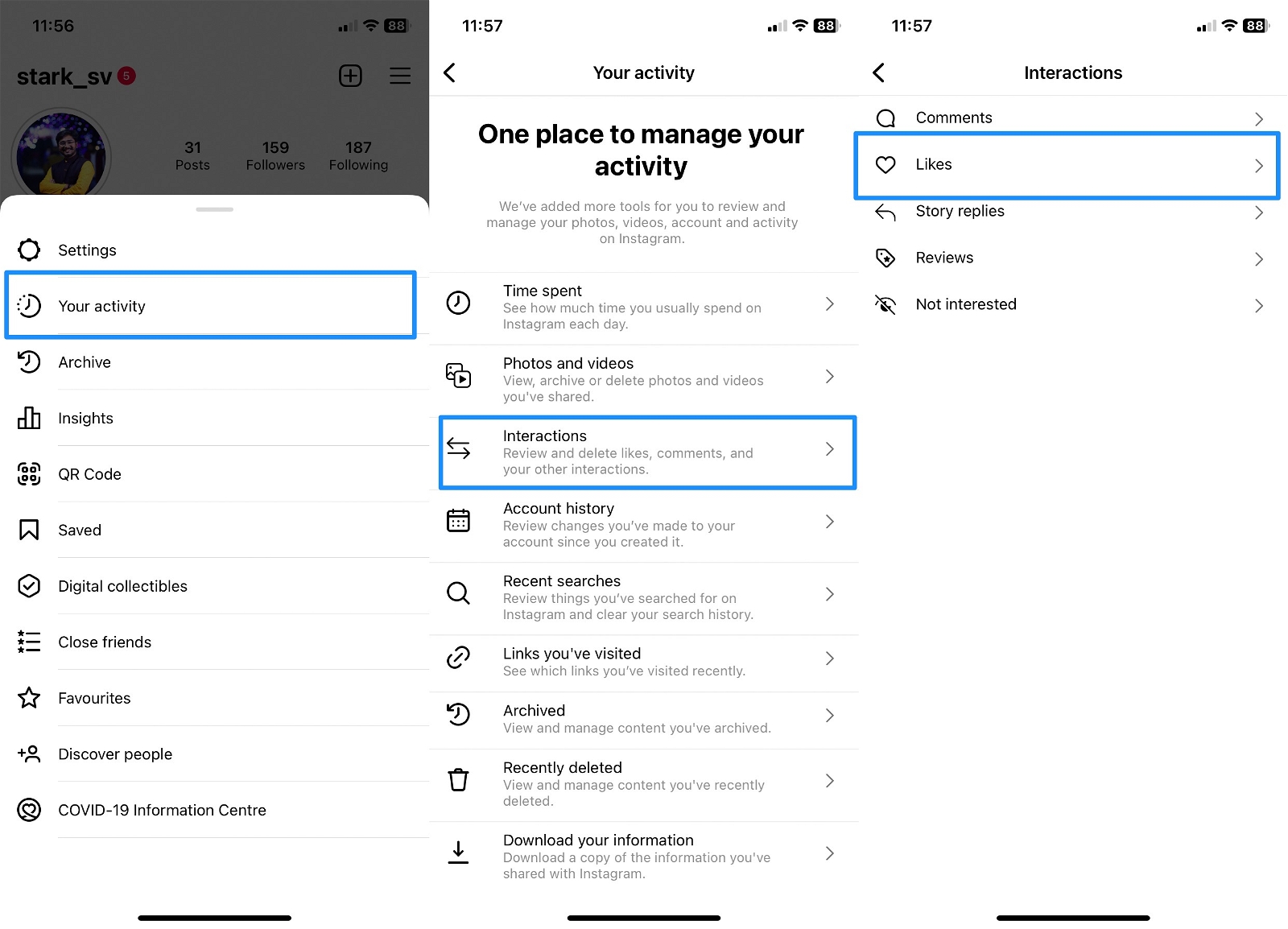
And then will be able to see all the posts that you had liked previously in ascending or descending order. These can be sorted by the date.
How to See Liked Posts on Instagram by Using a Desktop Browser
Follow the below straightforward steps to do so,
- Go to instagram.com and log in with your account.
- Now, while you are on the homepage of instagram.com, click on the More hamburger menu.
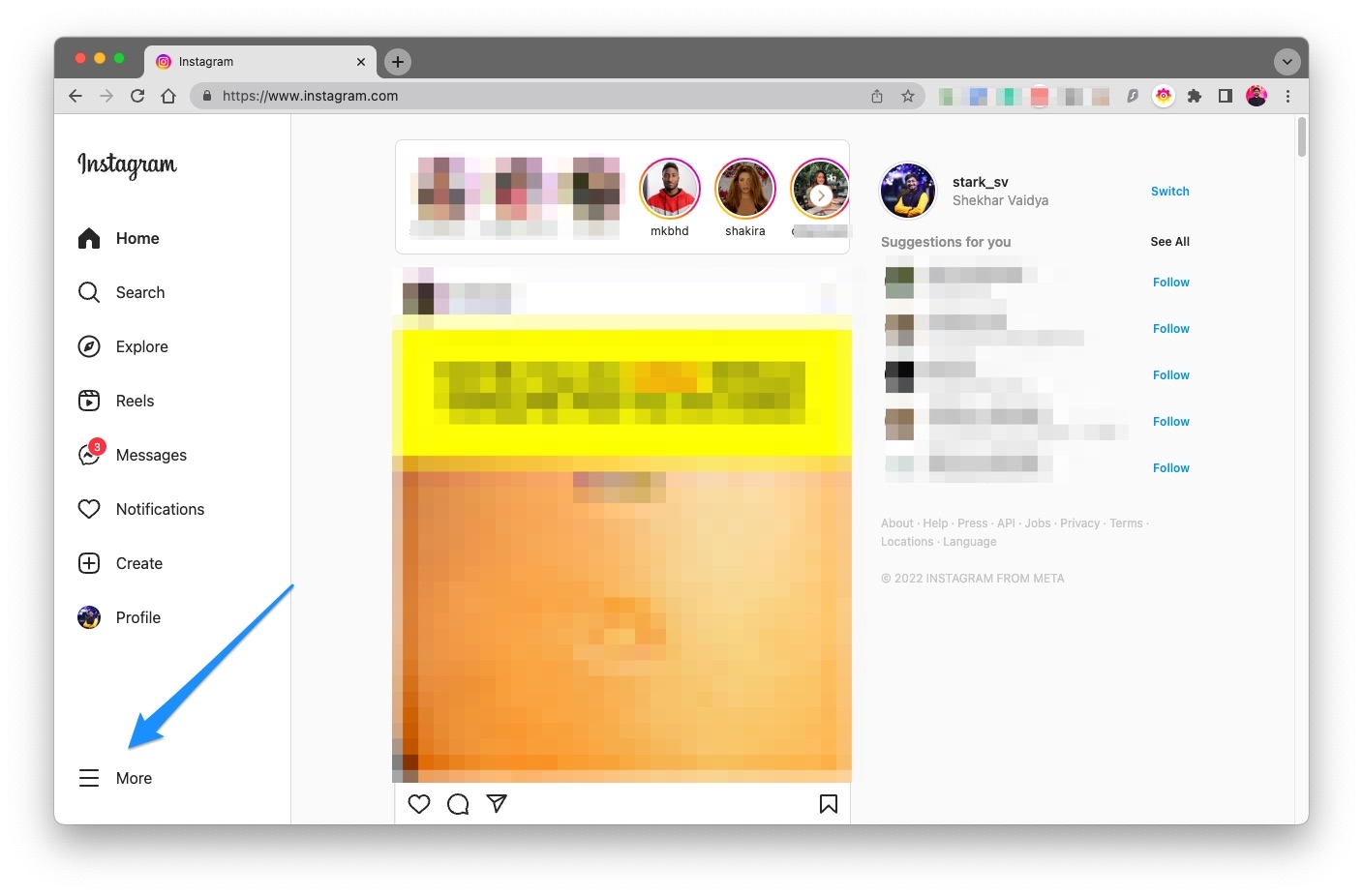
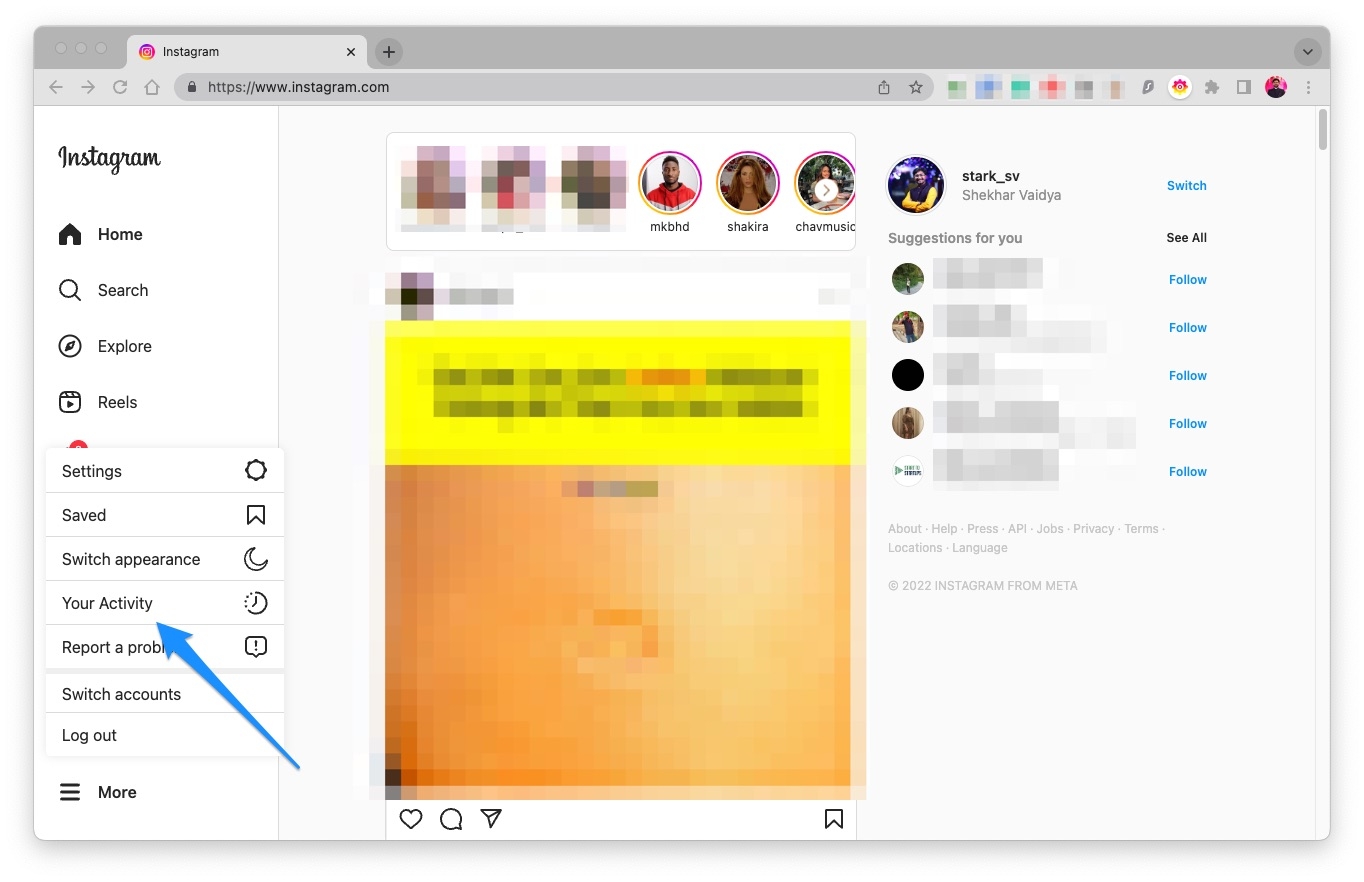
- As soon as you click on it, a new menu will appear, click on Your Activity from it.
- Finally, click on the Interactions section to see all your previously liked posts.
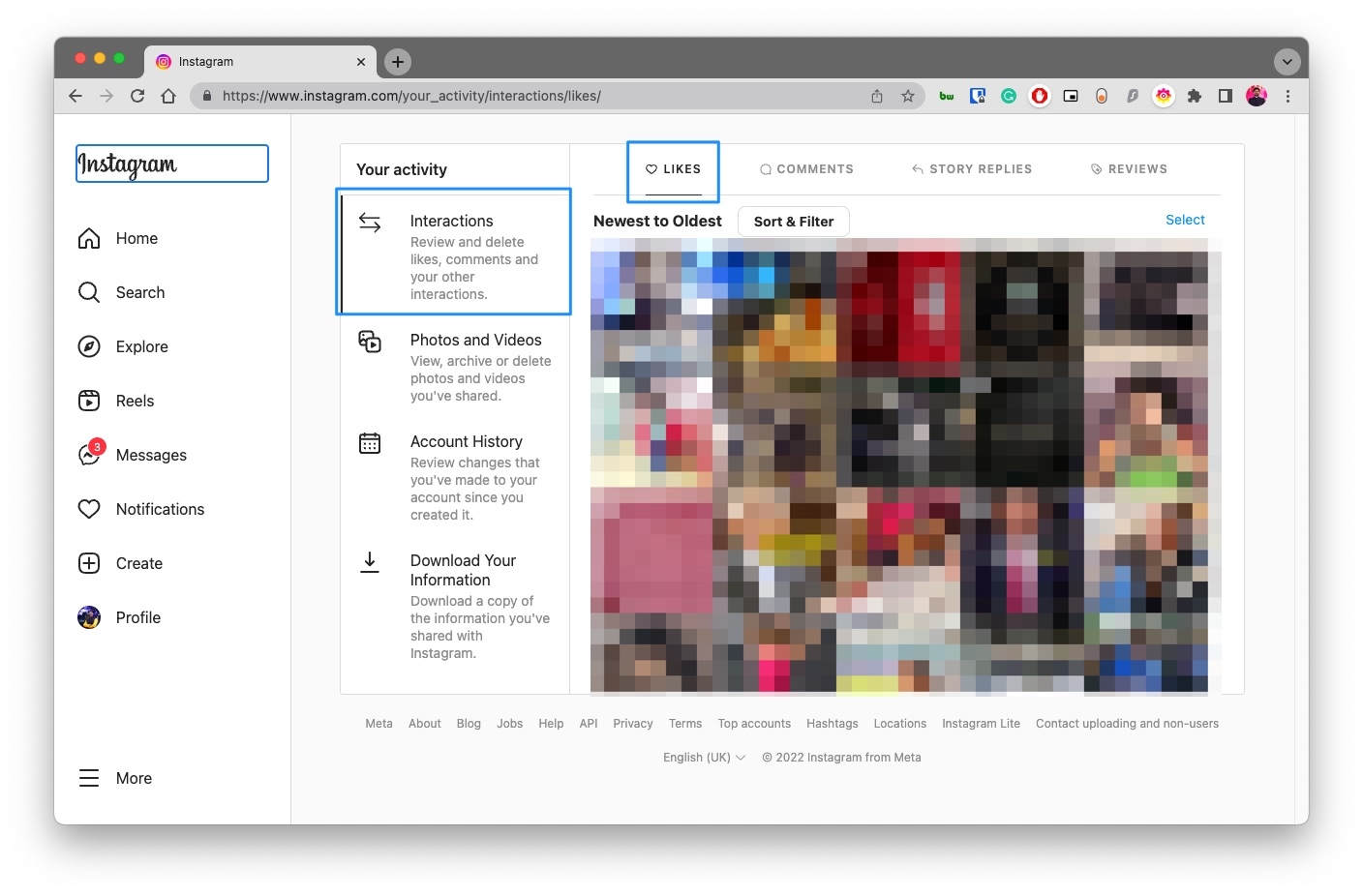
How many liked posts can you see at a time?
Thinking that there might be a limited number of likes that you can see well according to Instagram? Well, yes, only the last 300 recent posts you have liked can be seen at a time. If you want to see more, you have to go beyond that manually.
Is the history of all liked posts random?
Thankfully the like posts are not mixed, and thus you probably see them in an orderly fashion, sorted by the date on which they were liked. You can find them from newest to oldest or vice versa.
How can you hide your Like count on Instagram?
You might also want to hide the likes of your Instagram post for some reason. It’s possible and easy to do, go to Your Profile -> Hamburger Menu -> Settings -> Privacy -> Post -> Hide Likes and View Count .
Can I see my most liked posts?
Instagram takes care of this, and if you are a business or creator will get the option to look into your Instagram insights. With it, you will find the most liked posts on Instagram very easily. To achieve this, go to your profile page and click on insights, followed by the accounts reached option. Scroll down to see all your top-liked posts.
Is it possible that I don’t see the post that I have liked on Instagram?
Instagram keeps on updating the way it works. If for some reason, you cannot see the posts that you liked on Instagram, there are other ways to find all the likes. Go to Your Profile -> Hamburger Menu -> Your Activity -> Interactions -> Likes .
Further Reading
- How to Reverse Audio on Instagram?
- How to Get Disney Pixar Filter on Instagram?
- Why Can’t I Post Multiple Photos On Instagram?
Enjoyed this article?
If TechLatest has helped you, consider supporting us with a one-time tip on Ko-fi. Every contribution keeps our work free and independent.
