Highlights
- Beatsync turns everyday devices into a coordinated audio setup using nothing more than a browser.
- Its recent updates have made cross-device playback noticeably tighter and more dependable.
- The platform offers an easy way to build a multi-speaker environment without extra hardware or apps.
In recent years, turning several devices into one unified audio system has shifted from a weird idea to a genuinely useful setup.
Whether it’s a smart classroom, a casual hangout, or a small event, people want a simple way to play the same audio on multiple devices without messy cables or pricey multi-room gear.
Don’t want to miss the best from TechLatest ? Set us as a preferred source in Google Search and make sure you never miss our latest.
Beatsync fills that gap in every situation. Well, talking about this, it’s a browser-based audio synchronizer that has gained strong popularity, especially after its recent updates that improved queue management, timing accuracy, and overall stability.
Its biggest advantage is clarity: no app, no complex configuration, and no platform limits. If a device has a browser, it can join the sound.
So, if you want to use the Beatsync on your device, then this guide is for you. Here you will learn how to use Beatsync on Android, iOS, Windows, etc., devices.
Content Table
Why Audio Syncing Still Matters?
Currently, not every solution solves every situation. Bluetooth speakers have range issues, AirPlay works mainly inside the Apple ecosystem, and casting options like Chromecast or Miracast are inconsistent across brands.
Multi-room solutions from companies like Sonos are expensive, and they’re not something you casually set up with friends at a home party.
But most people have multiple devices lying around, old phones, tablets, laptops, and even smart TVs with browsers. The idea of using these devices as a distributed speaker system makes sense when:
- You want louder audio without buying new hardware
- You’re in a large room with many people, or sharing music among friends
- If you’re doing collaborative listening or teaching
- You want a DIY “surround style” arrangement
Beatsync is lightweight and web-based, and its recent updates have made audio synchronization far more stable.
What Beatsync Offers Today in 2025?
Beatsync is simple and easy to use, but several recent improvements have made it much more competent. Here’s what it currently offers:
- Web-based multi-device syncing: No downloads. No app stores. Everything runs on beatsync.gg through a browser.
- Reliable timing model: The latest revisions improved clock accuracy between devices, reducing timing drift. This is essential for audio syncing.
- Room-based system: You create a room, load audio, and share a link/code. Others join instantly from any modern browser.
- Support for mixed devices Android phones iPhones Windows PCs MacBooks iPads Linux systems Devices connected to speakers or headphones
- Updated queue management: A recent update added better queue controls- reorder, remove, and handle multiple tracks smoothly.
- Independent device audio: Each device controls its own volume, letting you arrange them around a space.
- Lightweight and fast: The platform is small, loads quickly, and doesn’t pressure a device’s hardware.
Syncing on Phones: Android, iPhone, and iPad
Phones are the most common devices people use with Beatsync, and the experience has become smoother with recent updates.
1) Android Phones
Android devices work particularly well because of how Chrome handles Web Audio. The performance is stable, and latency is predictable. Whether you’re using a budget device or a flagship, Beatsync generally performs consistently. Connecting an Android phone to:
- Bluetooth speakers
- Wired speakers
- Car audio
- Extends the audio reach further.
2) iPhones and iPads
Safari used to throttle audio tasks in earlier iOS versions, but recent updates made the experience reliable enough. Beatsync works smoothly on:
- iPhone 12 and later
- iPad 7th generation and newer
If you’re using Bluetooth or AirPods, the sync stays stable because Beatsync aligns playback based on the system clock, not real-time button press delays.
Here are some recommended setups for phones:
- Keep the screen awake at low brightness
- Disable battery saver (as it pauses background tasks)
- Keep devices on the same Wi-Fi network
Phones are perfect for filling small gaps in audio coverage, like corners of a room or outdoor areas.
Related Reads:
- How to Enable Lossless Audio in Spotify?
- How to Find Trending Audio on Instagram?
- Google Audio Overviews Turn Drive Documents into Quick, Easy-to-Listen Summaries
Syncing on PCs: Windows, macOS, and Linux
Desktop and laptop devices often deliver the most stable audio because of their better processors and browsers.
1) Windows PCs
Most users access Beatsync through Chrome or Edge. Both browsers handle the playback engine well. Connecting your laptop to external speakers gives the best experience because laptops typically have more powerful audio output.
2) MacBooks and iMacs
MacBook speakers, especially the newer models, produce surprisingly rich audio. This makes them good “center” or “anchor” devices in a Beatsync setup. Browser options such as Safari and Chrome both perform reliably.
3) Linux Machines
Beatsync works on Linux as long as the browser supports modern Web Audio features. Chrome-based browsers are usually the safest pick.
Here are some recommended PC setups to run Beatsync on PC:
- Close unwanted tabs
- Keep the device plugged in
- Disable any aggressive power-saving mode
PCs make great “main speakers” in a multi-device system.
Syncing on Mixed Devices: Creating a Multi-Speaker Arrangement
This is where Beatsync shines. Since it’s browser-based, you can combine any devices you have:
- Two laptops for left/right
- A phone near the sofa
- A tablet in the corner
- Another phone is near the kitchen
- A PC connected to a big speaker
By adjusting the volume individually on each device, you create a distributed sound that fills various directions. It’s not professional surround sound, but it gives a spacious, immersive feeling. Now, what matters the most:
- Laptops work well as “main” channels
- Phones fill small audio gaps
- Tablets add mid-range warmth
- External speakers give power
The trick is to treat each device like a part of a larger sound network.
How to Sync Audio Across Different Devices Using Beatsync
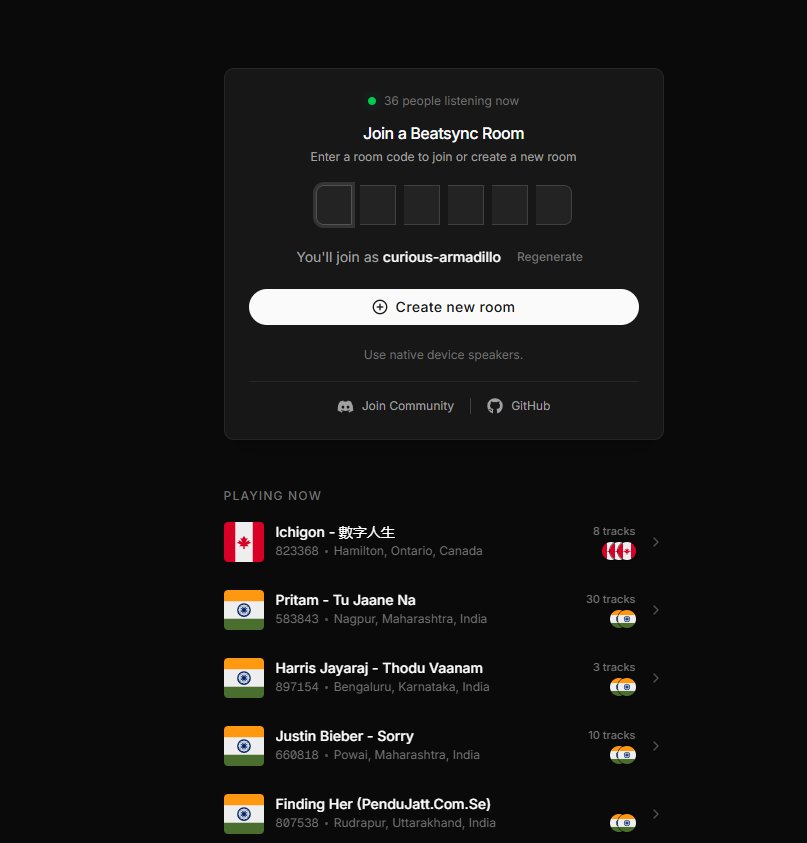
If a user wants to sync audio across multiple devices using Beat Sync, they simply go onto the website (beatsync.gg) and send out the exclusive link, which contains an audio file.
Other users then join the room using the link, and audio is shared in sync across all connected devices, with spatial audio effects like left and right channels or a center channel.
Conclusion
Beatsync makes multi-device audio very easy to use, and it works across phones and laptops without extra setup. Its recent updates have made it far more reliable. So, that’s all we have for you about how to use Beatsync on your device. We hope that this guide has helped you. For more info, comment below.
Enjoyed this article?
If TechLatest has helped you, consider supporting us with a one-time tip on Ko-fi. Every contribution keeps our work free and independent.
