There is no support for watching YouTube videos from within Android Auto, at least not officially. However, Google has restricted video apps in its car interface for safety reasons, so there will never officially be a YouTube app for Android Auto.
While parked, the UI might show it; you won’t be able to stream full video while the vehicle is in motion, but you are able to consume audio content (via YouTube Music or any other supported apps).
Don’t want to miss the best from TechLatest ? Set us as a preferred source in Google Search and make sure you never miss our latest.
In comparison, open‑source YouTube client NewPipe has had official Android Auto compatibility for some time now (as of version 0.28.0), letting you listen to YouTube audio (not video) on your own infotainment screen in the car.
In short, you can play YouTube videos with NewPipe on Android Auto; however, the video playback is not going to happen by any means.
Content Table
What NewPipe 0.28.0 Brings to Android Auto
- Official Android Auto integration: With NewPipe version 0.28.0 onward (released July 20, 2025), you can interact with YouTube content (search, history, playlists) within your car’s Android Auto UI.
- Stream access: This includes your watch history, your saved playlists (both local and in the cloud) and searching for new content; this is all controlled on the car’s display.
- Player and queue management: These audio sources will also receive a simplified, Android Auto-optimized player interface to allow for basic play/pause/skip and queue management through the car head unit.
- Google is loosening restrictions: Android Auto has added video and browser apps to Google’s own roadmap in recent months (as well as the capability for parked‑mode playback and audio‑only modes to Android Automotive), but there is no sign of the official YouTube app.
Important: Though the media in question is video content, Android Auto forces NewPipe into an audio‑only playback while driving (visuals are usually blocked when the vehicle is in motion).
Safety & Legal Considerations
- Always prioritize safety. NewPipe works in Android Auto only for audio playback, this being required to comply with Google’s drive-safety policy.
- It allows manufacturers to disable certain in-car visual features when the vehicle is in motion. To be used when stationary or while listening only.
- Policy violations against how NewPipe operates are the reason it cannot be found on Google Play; it scrapes (via NewPipe Extractor) rather than using YouTube APIs and does not display ads.
Is Full Video Viewing on Android Auto Possible?
NewPipe does not add video playback (visuals) to the Android Auto interface. The integration here is only for audio streaming, which includes live podcasts, music and the audio track of YouTube videos.
Screen‑mirroring, CarStream, or other hacks exist to bypass these restrictions, but are frequently unstable and not officially intended efforts.
Installing NewPipe 0.28.0 With Android Auto Support
First, though, you will need to be OK with installing outside of Google Play (as NewPipe is not available there), but it can, however, be found in both F‑Droid and GitHub releases.
Here are the verified steps :
- Install NewPipe using either: The custom repository on their official website , or The APK from GitHub Releases
- Backup your data (subscriptions, history, and playlists) within NewPipe if migrating between sources.
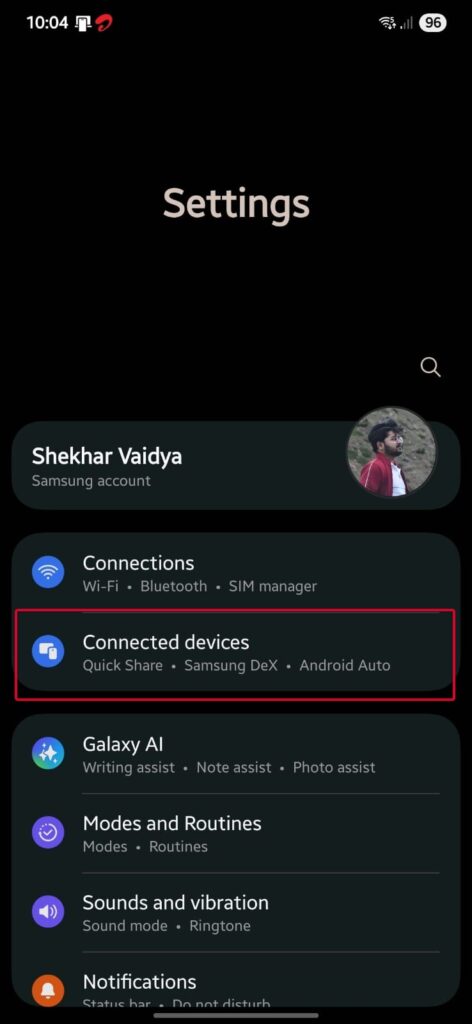
- Activate Android Auto developer mode on your phone: Settings> Connected devices> Connection preferences> Android Auto (or search for “ Android Auto ” in system Settings) Scroll to the end and tap “Version” 7 times to enable the developer mode. When prompted, press OK .
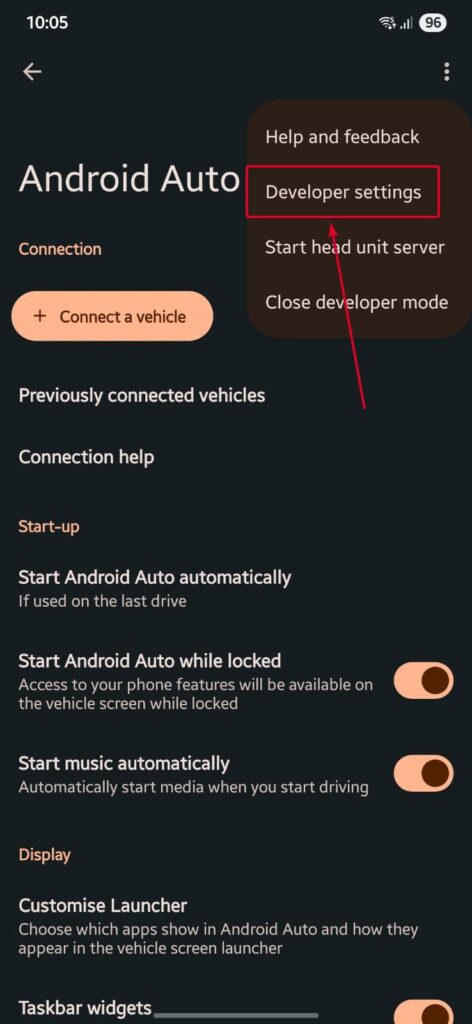
- Within Android Auto settings, tap the three‑dot menu , choose Developer settings , and enable “Unknown sources” to run NewPipe’s non‑Play‑Store APK in Android Auto.
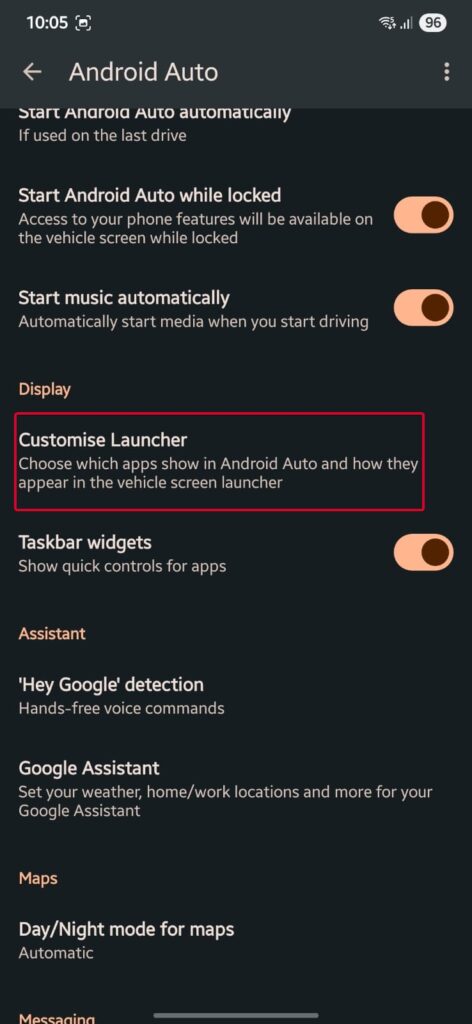
- Restart your phone. NewPipe should now show up in the app list on your car’s infotainment screen (it is necessary to restart the smartphone for it to reflect over).
- Simply plug your phone into Android Auto (via USB or wireless), and you should now see NewPipe appear in the list of available apps.
Users have reported that this procedure works; however, the early nightly versions were somewhat “buggy,” and using a stable, full-fledged NewPipe 0.28.0 targeted build is our goal here.
How to Use It Safely in the Car
NewPipe on Android Auto is an audio playback-only project, so it should be used when parked or when driving in a safe enough way that can also handle the car stereo. Here’s how to responsibly use it:
- Never try to watch video visuals while driving. The only version available for Android Auto is the audio-only mode, as Android Auto blocks anything more.
- Use voice controls or limited touchscreen inputs to search for or queue audio streams.
- Do not attempt to navigate random content while driving; better rely on playlists, history, or bookmarked stuff.
- If your car is at a standstill, you might get some visual UI, but Google’s big picture roadmap says standalone video apps will still be out of reach until parked.
Can I watch full YouTube videos on Android Auto using NewPipe?
No, Android Auto stops video playback when the car is moving. Only audio streams can be played with NewPipe integration.
Does NewPipe require a Google account?
No, NewPipe works without Google APIs or logins, which makes it privacy-friendly and gives you the content you want, unlike YouTube.
Is it legal or safe to use NewPipe while driving?
If you just play audio and keep from buying choices on the in-car screen, it seems safe enough. Mainly to drive with music/podcasts.
Will NewPipe break with future Android Auto updates?
While 0.28.0 (and higher) is official and stable, adjustments may need to be made for any future Android Auto updates. For now, continue to follow the official blog or GitHub for new NewPipe updates.
Why isn’t NewPipe on Google Play?
As it is breaking Play Store policies, you can watch YouTube without any official API or account login. They only distribute it through open-source channels.
Conclusion
NewPipe, since version 0.28.0 (released in July 2025), officially supports Android Auto audio integration to play YouTube content, including history, playlists, and search results — within your car’s infotainment audio system.
While this is still a blind negotiation for security, it’s good that there is finally an official yet permanent and supported method of listening to YouTube audio on Android Auto without any hacks or root.
If you follow the tested activation instructions, installing via F‑Droid or GitHub (NewPipe), switching on Android Auto developer mode and unknown sources, then hitting your vehicle’s “reboot” button, you’ll be good to go right away.
Enjoyed this article?
If TechLatest has helped you, consider supporting us with a one-time tip on Ko-fi. Every contribution keeps our work free and independent.
