Highlights
- Instagram users have the option of following others to be kept up to date with each post they make.
- When you block people on Instagram who you know in real life, it can be clumsy.
- It’s not clear to most people what the difference is between the three or what happens when you block, report, and restrict a profile on Instagram.
- This article will explain everything about Instagram restrict vs. block.
Have you ever wondered what the difference is between blocking and restricting someone? Perhaps many users don’t understand the difference between the two.
The main difference between restricting and blocking is that restricting is a form of control. The person will know if you block them, so Instagram introduces a feature called restrict.
Don’t want to miss the best from TechLatest ? Set us as a preferred source in Google Search and make sure you never miss our latest.
Content Table
What Does Restrict Mean on Instagram?
It is marketed as a way to prevent bullying on Instagram, thus preventing unwanted interactions from taking place. Restrict is a slightly toned-down version of blocking, which offers limited blocking capabilities.
Do Restricted Accounts Have The Ability to Tag You or Mention You in Their Posts?
Instagram blocks users from tagging you in posts and stories when they block you. You won’t have your username available to them when they try to mention you. In contrast, when you restrict an account, they still have the ability to tag or mention you.
You will also receive notifications when you are mentioned in a story or tagged in a post by a restricted account. Therefore, you should block that account if you do not wish to be tagged without your permission.
Instagram Block vs. Restrict Differences
#1. On Profile
Whenever you block someone on Instagram, their account is hidden. There is no way they could find it if they looked for it. If they access your profile through another profile you haven’t blocked, they won’t be able to see your posts, Stories, or profile information.
Despite the fact that the blocked profile appears empty to you, you still have access to it. It is not possible for you to access their profile information and content. Instagram allows you to report profiles that breach community guidelines before blocking them if you are concerned about their Instagram posts.
You cannot restrict someone on Instagram from seeing your profile or posts when you use the restrict option. It is still possible for them to watch your Stories and feed, as well as for you to watch theirs. If you’ve been restricted on Instagram, it’s much harder to determine if you’ve been blocked.
#2. On Comment
#3. Messages
On Instagram, you cannot message someone you’ve blocked. However, if you restrict an account, it works differently. Consequently, these consequences follow:
- If a person is restricted, they can message you. Nevertheless, their messages appear in the Requests folder.
- If they message you, you won’t receive a notification. Only if you manually view your message requests will you be able to see their messages.
- Your view of their message does not alert them via the “seen” text in the chat. Therefore, they will not be able to tell when you have read their message.
- Instagram will notify you if you’re in a group chat with someone whose account you’ve restricted. After that, you can decide whether to leave or stay in the group.
#4 Posts
How Does Instagram Work When You Block Someone?
- There will no longer be any likes and comments left on your profile by that user. Even if you unblock them, they won’t return.
- By using the @ function, they cannot mention your username in photos or tag you in photos. It is possible, however, for someone to mention you if they know your new username if you change your username.
- If they follow you on a public or private account, they can see your likes and comments.
- In your DMs, you can still see the previous messages you sent to the blocked user, even though you cannot message them.
- You will be asked whether you wish to leave the group chat if you are in one with the blocked person on Instagram. Your blocked person will be able to see your messages if you choose to stay.
- You can also send a message to the blocked user from your DM thread. Even after unblocking them, the message will not reach you.
- If they are following you, then blocking them automatically unfollows them from your profile as well. Once you’ve unblocked them, you’ll have to follow them for the same reason.
How to Block a User On Instagram?
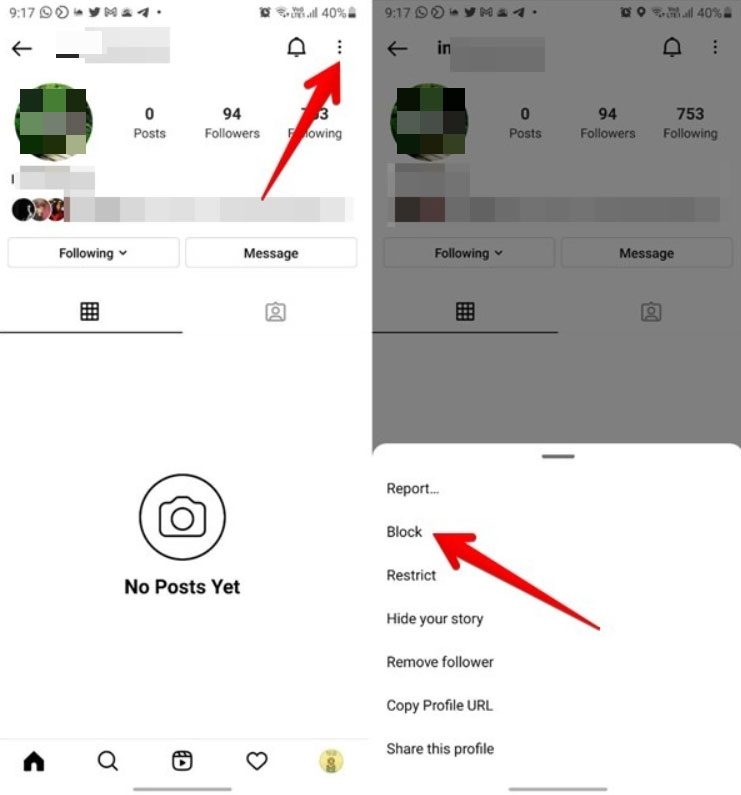
So, to block a user on Instagram, follow the steps below.
- Initially, to block a user, tap their profile .
- In the top right corner, tap the 3 dotted icon
- Choose Block from the menu.
- To confirm your action, click the Block button. Also, select whether to block new accounts they create.
How to Restrict a User On Instagram?
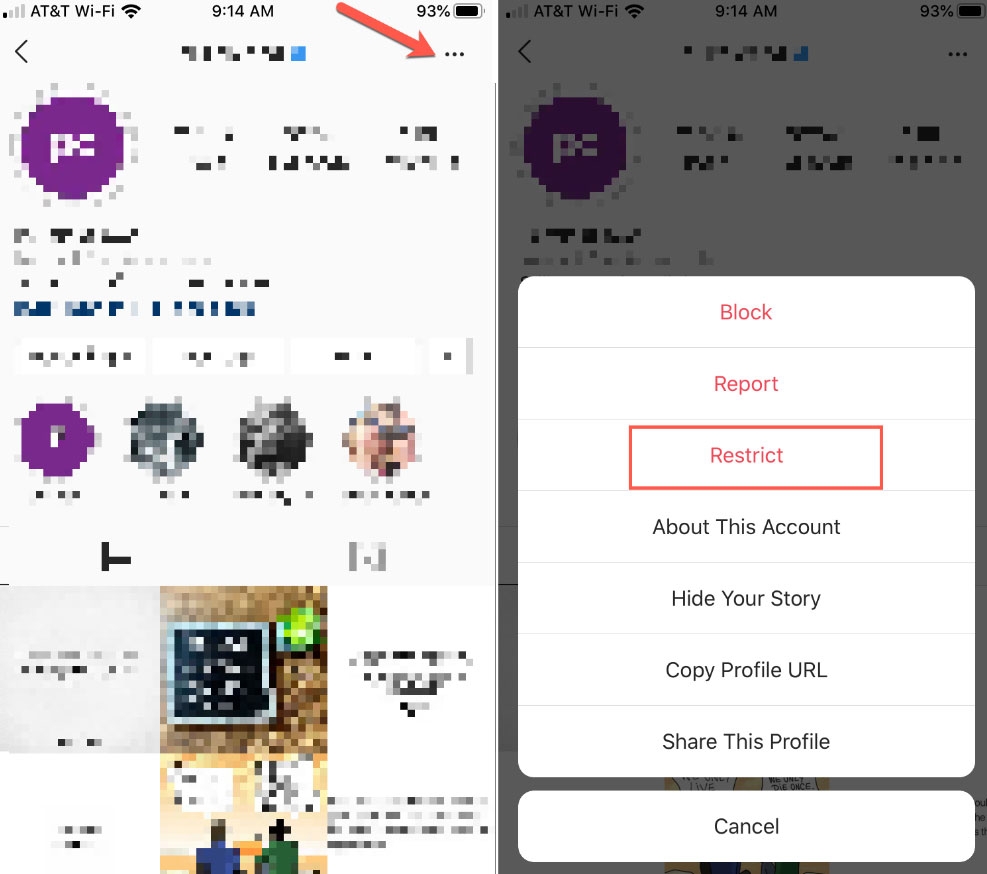
To restrict a user on Instagram, follow the steps below.
- Go to the profile of the user you want to restrict.
- In the top right corner, tap the three-dotted icon.
- Then select Restrict .
Can Restricted Accounts See My Story?
Wrapping Up
So, that’s all we have for you about Instagram restrict vs. block. Thank you for giving your valuable time to read this guide. It’s our hope that this guide has helped you. Meanwhile, feel free to comment below if you have any questions or queries.
Further Reading:
- What Does “Instagram User” Mean?
- How to Find Trending Audio on Instagram?
- Top 5 Best Tools to Download Instagram Stories for Free
Enjoyed this article?
If TechLatest has helped you, consider supporting us with a one-time tip on Ko-fi. Every contribution keeps our work free and independent.
