Highlights
- Users on PCs with TPM disabled are still seeing Windows 11 upgrade offers.
- Lenovo IdeaPad S145‑15IWL with 8th Gen Intel was offered the upgrade despite TPM off.
- This suggests a glitch in Microsoft’s update delivery, repeating earlier incidents.
Okay, so here’s something odd I’ve noticed recently. Some people, including me, have started seeing Windows 11 upgrade offers pop up on systems that shouldn’t really be eligible.
These are systems that don’t meet the official requirements , and still, Windows is trying to push the upgrade.
Don’t want to miss the best from TechLatest ? Set us as a preferred source in Google Search and make sure you never miss our latest.
So, if you’re wondering what’s going on, let me break it down in the simplest way possible. This whole Windows 11 to unsupported PCs thing is getting a bit weird, and honestly, confusing for many.
Why You’re Seeing Windows 11 Upgrade Offers on Unsupported PCs
What exactly happened
There’s this update, KB5001716 , that Microsoft keeps pushing out. Normally, it works in the background and most people don’t even know it’s there.
But now, after installing it, some users are getting prompted to upgrade to Windows 11 even if their PCs aren’t fully supported.
One example I came across is from a user who owns a Lenovo IdeaPad S145-15IWL. It has an 8th Gen Intel i5 processor, which is supported by Windows 11.
But here’s the catch: they had TPM disabled . TPM is supposed to be one of the strict rules for upgrading. They actually disabled it on purpose to avoid the upgrade. Yet, the offer still showed up.
That’s not supposed to happen, right?
The TPM part
So, TPM or Trusted Platform Module is basically a security chip. Microsoft made it a must-have for installing Windows 11.
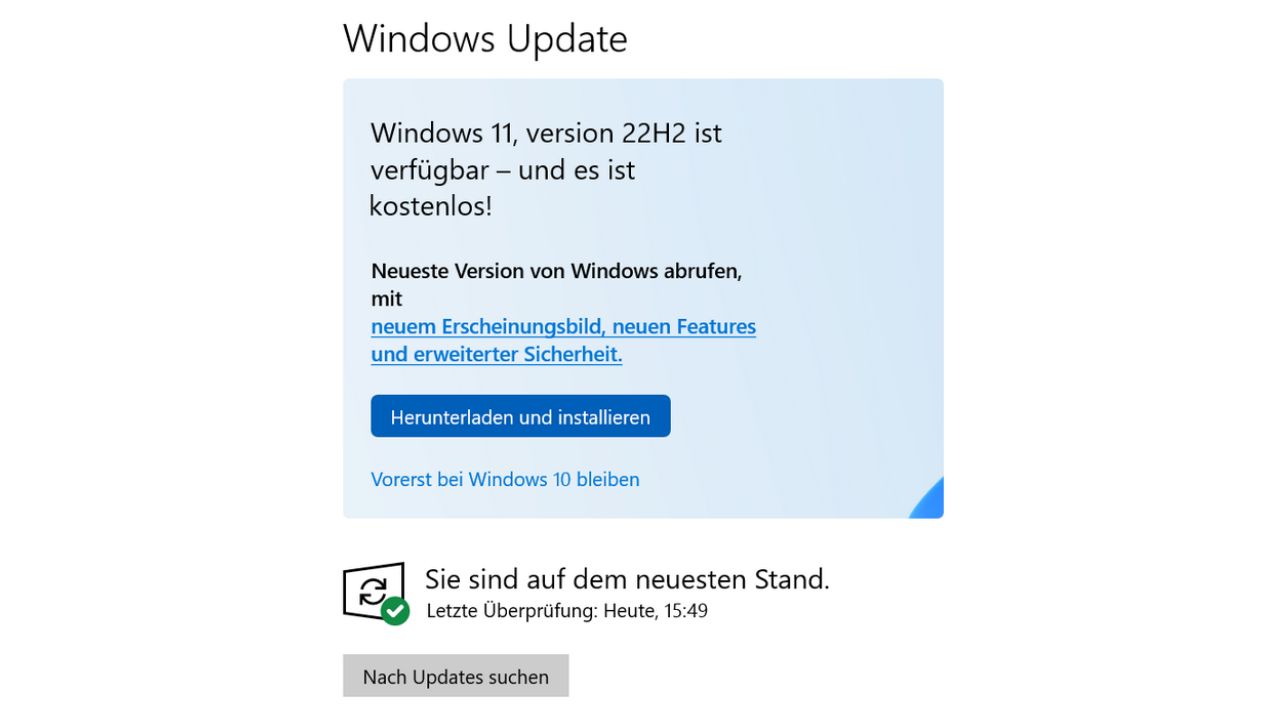
Image Credits: Borncity
They’ve been super clear about it. Without TPM 2.0, your PC technically isn’t ready for the upgrade. But now, with these weird update prompts showing up even when TPM is off, it looks like something’s broken or Microsoft’s checks are not working properly.
And no, they didn’t change the TPM rules recently. The CPU support list got updated for Windows 11 24H2, mostly for new AI laptops, but TPM requirements are still the same .
Is this a glitch or what
Most likely, yeah. This isn’t the first time something like this happened. There have been cases before where unsupported PCs got upgraded.
Some of them even went through the whole upgrade process without any issues. So it could be a bug, or Microsoft just slipping up on their part.
It doesn’t look like they’re doing it on purpose. But yeah, it raises a lot of questions about how solid these upgrade checks actually are.
What you should do
If you’re seeing a Windows 11 upgrade prompt on a PC that you know isn’t supported, don’t just click next and install . Take a minute. Check if TPM is enabled. Check if your CPU and system match Microsoft’s official list.
And if your TPM is disabled on purpose like that Lenovo guy, just know that upgrading might mess things up. Some stuff might not work properly after the upgrade, or maybe your PC might slow down or act weird.
Related Reads:
- Download Latest Windows 11 ISO File (24H2- 2024 Update)
- Ghost Spectre Windows 11 Pro (24H2 – 2024 Update)
- Want to Try Windows 11 24H2 on Your Unsupported PC? Here’s How
So yeah, Windows 11 to unsupported PCs is clearly a thing now. Whether it’s intentional or just a glitch, it’s happening. Microsoft’s own upgrade system isn’t being consistent, and it’s putting users in a tricky spot.
If you’re getting those prompts, my advice is simple. Don’t rush . Make sure your system is really supported before going forward. Because once you upgrade, going back isn’t always that easy.
Via
Enjoyed this article?
If TechLatest has helped you, consider supporting us with a one-time tip on Ko-fi. Every contribution keeps our work free and independent.
