Highlights
- Microsoft has renamed Xbox Game Pass tiers and added new perks across all plans.
- Existing subscribers are automatically moved to the new tiers without any extra steps.
- Game Pass Ultimate sees a price hike, while Premium and Essential now include PC games at no extra cost.
If you’re an Xbox player, you’ve probably seen the buzz about Microsoft shaking things up with Xbox Game Pass .
On October 1st, the company rolled out a major update that changes the tier names, adds new perks, and in some cases, increases prices.
Don’t want to miss the best from TechLatest ? Set us as a preferred source in Google Search and make sure you never miss our latest.
That’s exactly what this guide is about. I’ll break everything down in plain, simple English—what changed, how it affects your current plan, and what you need to do next (if anything).
The new Xbox Game Pass tiers
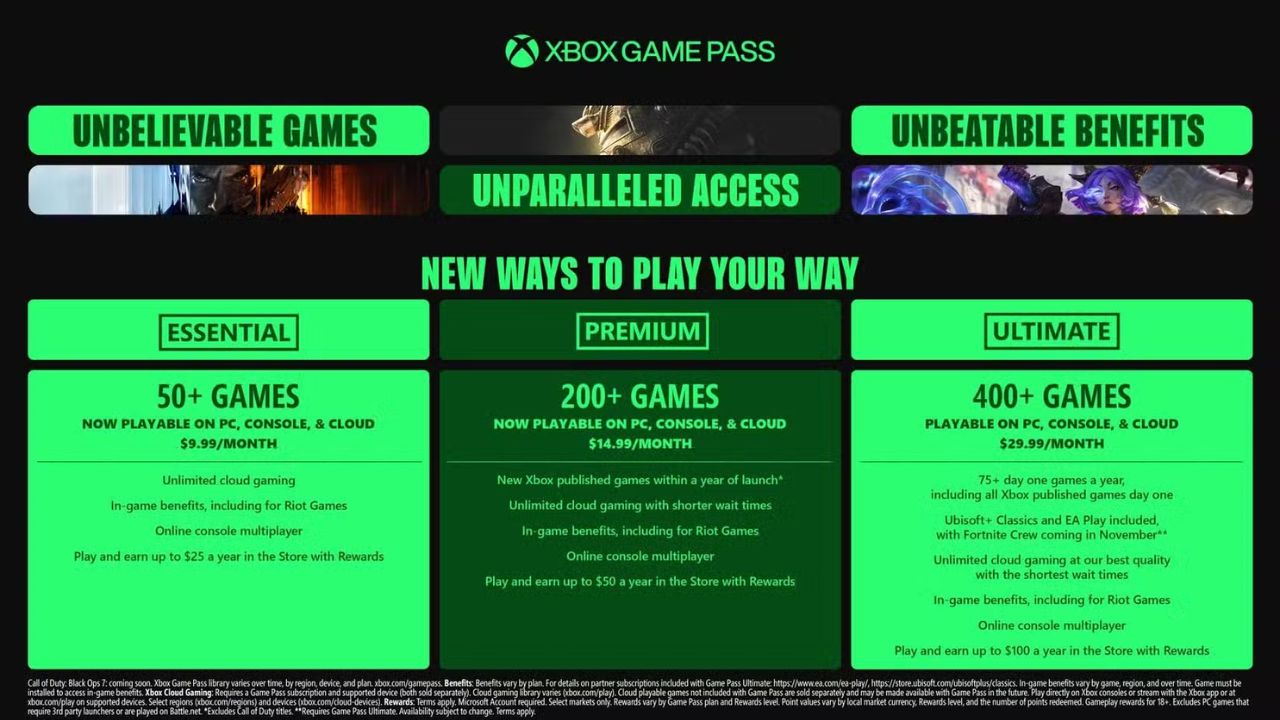
Image Credits: Xbox
The first thing Microsoft did was rename the subscription tiers. Don’t worry, the plans themselves are still familiar, but the names are different:
- Game Pass Ultimate – Stays the same
- Game Pass Standard – Now called Game Pass Premium
- Game Pass Core – Now called Game Pass Essential
Think of it as a fresh coat of paint. Now, let’s go deeper into what each tier really offers.
Game Pass ultimate: more perks, higher price
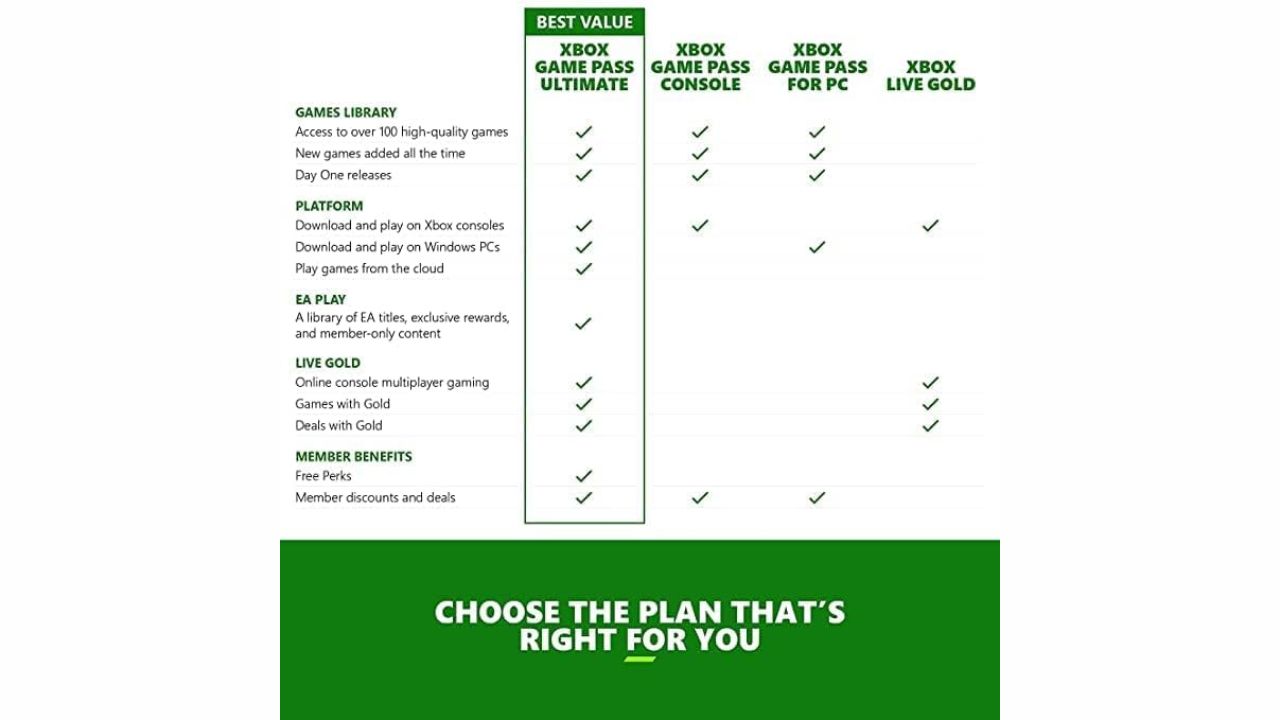
Image Credits: Xbox
If you’re already on the Ultimate plan, this is the biggest change you’ll notice.
- New Price: $29.99 per month (up from $19.99)
- What’s New: PC games are included by default Ubisoft+ Classics with access to hits like Assassin’s Creed Fortnite Crew benefits, including monthly V-Bucks and exclusive items Priority cloud gaming with “best quality” and shorter wait times Store rewards up to $100 per year
Game Pass premium: PC games added, price stays the same
The old Standard plan is now Game Pass Premium , and it’s still $14.99 per month.
- PC games are now included in this plan (previously console-only)
- You don’t get Xbox-published games on release day, but they arrive within a year
- Unlimited Xbox Cloud Gaming access
- Store rewards up to $50 per year
In short, this tier just became a much better deal without raising the price.
Game Pass essential: new name, same price
Formerly Game Pass Core , this is the entry-level plan at $9.99 per month.
- Now includes PC games
- Unlimited Xbox Cloud Gaming
- Store rewards up to $25 per year
- No day-one access to Xbox-published titles
If you’re a casual gamer or only play occasionally, this plan covers the basics at the lowest cost.
Here’s the best part, you don’t have to lift a finger.
- Old Ultimate subscribers – Stay on Ultimate
- Old Standard subscribers – Moved to Premium
- Old Core subscribers – Moved to Essential
The transition is seamless, so you’ll log in one day and just see the new names. No setup, no extra clicks, nothing to worry about.
How to change your Game Pass plan?
What if you don’t like your new tier, or maybe you want to upgrade? The process is quick and simple.
On Your Xbox console or Xbox app
- Open your profile settings.
- Go to the Subscriptions section.
- Select your Game Pass subscription .
- Choose Change subscription .
- Pick the tier you want.
Using a web browser
- Log in to your Microsoft account.
- Go to the Subscriptions tab.
- Select your Game Pass subscription .
- Click Manage .
- Pick your new tier.
Quick Tip: If you upgrade, you’ll pay the difference immediately. If you downgrade, the change takes effect on your next billing date, but you’ll keep higher-tier perks until then.
How to cancel Xbox Game Pass?
If the new tiers don’t fit your budget or gaming habits, cancellation is easy.
- Open the same Manage Subscription page.
- Select Cancel subscription .
- Confirm your choice.
Your plan will stay active until the end of your current billing cycle. After that, you won’t be charged again. Keep in mind that Microsoft doesn’t offer refunds for the remaining days—you’ll just use the time you’ve already paid for.
- How to Unblock People on Xbox?
- What is Xbox Cloud Gaming? Everything You Need to Know
- Free Xbox Game for Amazon Prime Members – Claim It Before It’s Gone!
For most players, this update is actually a win, since PC games are now included across all plans. If you’re on the fence, you can always upgrade, downgrade, or cancel in just a few steps.
Whether you’re a casual gamer or a hardcore Xbox fan, the new system gives you flexibility, and more value, for the games you love.
Enjoyed this article?
If TechLatest has helped you, consider supporting us with a one-time tip on Ko-fi. Every contribution keeps our work free and independent.
