Highlights
- This error occurs when a load balancer or reverse proxy is unable to establish a connection with any working backend server, thereby leading to 502/503 errors.
- Some of the common reasons are that services are crashed, a health check failed or a network problem.
- In this guide, you will learn what causes it and how to correct it, helping you avoid major downtime.

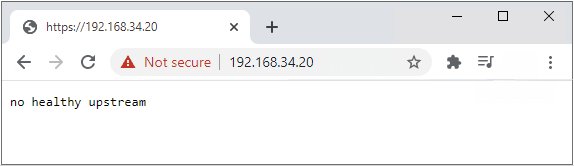
When you see a “No Healthy Upstream” error from web applications, APIs or services, it often signals that your load balancer or gateway has exhausted its pool of healthy backend servers to pass requests on to.
This is to say that the “traffic director” has no valid targets, and as such, your users’ requests will go nowhere, which means a failed connection, an outage, and unhappy customers.
Don’t want to miss the best from TechLatest ? Set us as a preferred source in Google Search and make sure you never miss our latest.
This can happen in pretty much any type of setup could be as Nginx reverse proxies, Kubernetes clusters, Docker containers, or virtualized like VMware vCenter, etc.
Now, the actual root cause will vary based on your setup, but in general, here is what went wrong: your upstream services were either down, teetering with health checks, or being blocked by some misconfiguration.
Content Table
What does the “No Healthy Upstream” error mean?
An upstream, in the context of load-balanced or service-mesh architectures, represents the backend servers or services that handle requests coming from clients.
The load balancer or gateway (e.g., Nginx, Envoy, API Gateway) makes the decision about which upstream server needs to take responsibility for a request.
If none of the configured health checks pass on any upstream, or if you cannot reach any of them, you receive the No Healthy Upstream error.
Typical scenarios where this appears
- Failure in health check due to either slow response or incorrect configuration.
- The backend services are not accessible because of network connectivity issues.
- If a routing rule is improperly configured, traffic goes to incorrect targets.
Examples in different systems
- Nginx : [error] no live upstreams while connecting to upstream
- Kubernetes : 0/3 nodes are available: 3 node(s) had taints that the pod didn’t tolerate
- Docker : service “app” is not healthy
Common Causes Across Platforms
While the exact reason differs depending on the environment, the most common causes include:
- Backend service crashes or shuts down: Service stops or crashes, and there are no more instances running.
- Incorrect health check settings: If it fails, the load balancer deems healthy servers as “down,” removing them from the pool.
- DNS resolution problems: The domain name of the backend can not be resolved to an IP address.
- Port mismatch: The upstream settings configuration about an incorrect port that the backend service listens on.
- Network policies and firewalls: The load balancer cannot communicate with the backend as blocked by security rules.
- Certificate expiration: In SSL/TLS configurations, expired certificates can disrupt secure connections.
- Pod scheduling or node taints in Kubernetes: Incompatible node conditions may cause pods to not run.
How to Diagnose the Error
The beginning phase to solve the No healthy upstream error will be determining where it is failing, either at the load balancer, network or backend service.
Step 1: Check Backend Availability
- For Linux services: systemctl status
- For network port checks: netstat -tulpn | grep
Step 2: Test Network Connectivity
- From the load balancer to the backend:
# Example (replace placeholders before running):
curl -v <BACKEND_HOST>:<PORT>/<HEALTH_PATH>

Example Command
- Test DNS resolution: dig backend.example.com
Step 3 – Review Logs
- Nginx : /var/log/nginx/error.log
- Kubernetes : kubectl describe pod
- Docker : docker logs <container_id>
- vCenter : Certificate and service logs
Step 4 – Verify Health Checks
- Ensure your /health endpoint returns an appropriate 200 OK or similar status.
- Ensure the path and method are what the load balancer is configured to check.
Platform-Specific Fixes
A. Nginx
If Nginx shows no live upstreams, lists are usually a sign of an issue related to your backend definitions or failure in the health check.
Checklist for Fixing Nginx:
- Confirm backend IP/hostnames are correct.
- Verify backend services are running and reachable.
- Adjust health check configurations:
upstream backend {
    server backend1.example.com:8080 max_fails=3 fail_timeout=30s;
    server backend2.example.com:8080 backup;
}
- Optionally add active health checks (requires Nginx Plus or a module):
check interval=3000 rise=2 fall=5 timeout=1000 type=http;
check_http_send "HEAD / HTTP/1.0\r\n\r\n";
check_http_expect_alive http_2xx http_3xx;
B. Kubernetes
In Kubernetes load balancing, you want readiness probes and service-to-pod mapping.
Common fixes:
- Ensure pods are running: kubectl get pods
- Check readiness probe settings:
readinessProbe:
  httpGet:
    path: /health
    port: 8080
  initialDelaySeconds: 5
  periodSeconds: 10
- Verify service selectors match pod labels.
- Inspect network policies for blocked traffic.
C. Docker
In Docker and Docker Compose, if the health checks for a container are passing, when marked healthy.
Fix steps:
- Review container health status: docker inspect <container_id>
Implement or correct a health check in docker-compose.yml:
healthcheck:
  test: ["CMD", "curl", "-f", "http://localhost/health"]
  interval: 30s
  timeout: 10s
  retries: 3
- Ensure your service actually serves the /health endpoint.
D. VMware vCenter
Often, the reason may be due to expired SSL certificates. This is mostly relevant to vCenter users. Here how you check if the certificates are expired or not:
- Initially, launch vCenter Appliance .
- Execute this command: for store in $(/usr/lib/vmware-vmafd/bin/vecs-cli store list | grep -v TRUSTED_ROOT_CRLS); do echo “[*] Store :” $store; /usr/lib/vmware-vmafd/bin/vecs-cli entry list –store $store –text | grep -ie “Alias” -ie “Not After”;done;
- Now, see if the Machine_SSL and the Solution User certificates are expired. If they are then replace them.
- You can also execute the vCenter Windows or PowerShell for this: $VCInstallHome = [System.Environment]::ExpandEnvironmentVariables(“%VMWARE_CIS_HOME%”);foreach ($STORE in & “$VCInstallHome\vmafdd\vecs-cli” store list){Write-host STORE: $STORE;& “$VCInstallHome\vmafdd\vecs-cli” entry list –store $STORE –text | findstr /C:”Alias” /C:”Not After”}
Immediate Recovery Actions
If you need a quick restore while you work on the root cause:
- Retry the service on the backend, which gives temporary services in the updated version of the Backend Service.
- Update DNS or IP addresses if there’s a resolution issue.
- Add a backup server to the upstream block as a temporary handler.
- Temporarily disable bad health checks (not a permanent solution).
Preventing No Healthy Upstream Errors
Prevention is about resilience and visibility :
- Health Check Best Practices Each service can offer /health endpoints If service is up, it just responds with a simple 200 OK. These timeouts + retry limit should actually represent a real performance.
- Redundancy Use multiple backend instances. Always be ready to bring up at least one more backup server.
- Monitoring & Alerts Prometheus + Grafana, Datadog or New Relic that can alert you before total upstream failure. Monitor latency, error rates, and connection counts .
- Configuration Hygiene Keep DNS records updated. Document service ports and health check paths. Use circuit breakers to prevent cascading failures.
- Security & Network Rules Regularly review firewall rules and Kubernetes network policies Keep SSL certificates up to date.
Can I fix this without server access?
No, you need to be a system administrator or developer to fix backend or configuration issues, if there are any.
Is it always a backend issue?
Not always, except for when it is a load balancer or DNS configuration.
How long does it take to fix?
Minor misconfigurations can be fixed in minutes; network or scaling issues may take hours.
Does this affect performance even before total failure?
Yes, upstream partial failures can lead to latency and error rate increases even before the full outage.
Which monitoring tools are best?
Prometheus + Grafana, Datadog, New Relic and native cloud monitoring are all great.
Final Thoughts
No Healthy Upstream error, it seems to be more than just a vague bug; this is an indicator that the system handling requests toward your backend infrastructure has no access to those backends.
An error message to the end user and an action item for the Admin. It does not matter if you are running Nginx, Kubernetes, Docker and VMware; the principles remain the same. Monitor, verify configuration, confirm access to the network, and validate service health.
Through a combination of quick fixes and long-term solutions, you can greatly reduce the chance that this error will ever impact your services.
Enjoyed this article?
If TechLatest has helped you, consider supporting us with a one-time tip on Ko-fi. Every contribution keeps our work free and independent.
