
When your product serves millions of users, minor problems can quickly grow into major frustrations. A button stops responding. A layout changes without warning. A familiar workflow becomes confusing. These moments chip away at user trust. You may not see the impact in dashboards right away, but users notice instantly.
This is where Net Promoter Score (NPS) comes in. It is not just another metric. It is an early signal that something might be off. Before users churn or engagement drops, NPS helps you catch issues in time to fix them.
Don’t want to miss the best from TechLatest ? Set us as a preferred source in Google Search and make sure you never miss our latest.
This article outlines a clear strategy for utilizing NPS to inform product decisions, minimize friction, and enhance customer satisfaction. The approach shared here supported a measurable improvement in NPS on a high-traffic automation platform with over a million active users.
Content Table
What NPS Measures and Why It Matters
NPS is built around one question:
“How likely are you to recommend this product to a friend or colleague?”
Responses fall into three groups:
- Promoters (9–10): Enthusiastic users who recommend the product
- Passives (7–8): Neutral users who are open to switching
- Detractors (0–6): Unhappy users who may churn or complain
To calculate NPS, subtract the percentage of detractors from the percentage of promoters. The score ranges from -100 to +100.
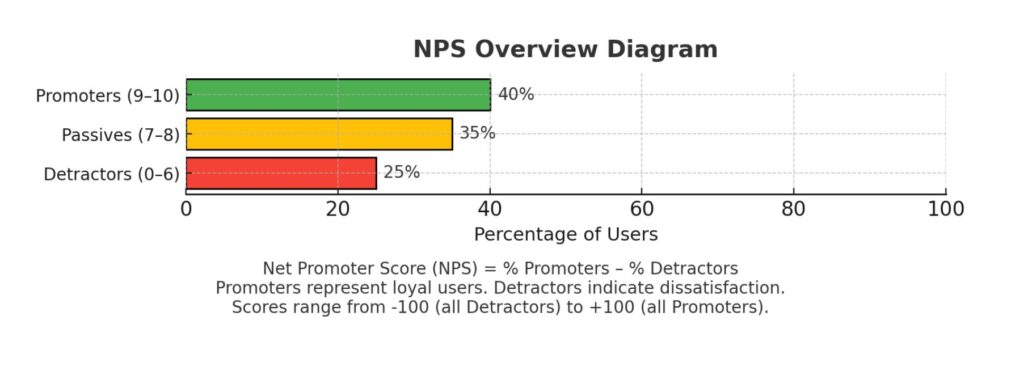
Image: NPS Overview Diagram
The value of NPS comes from its speed. A user may still complete tasks but feel frustrated in the process. NPS captures this emotional shift before engagement metrics decline. This makes it especially valuable after product redesigns or major feature updates.
Make NPS Part of the Product Process
A one-time survey won’t give you much to work with. To be effective, NPS needs to be integrated into how your team works. Here’s how to build that into your product development process:
1. Send Surveys After Real Interactions
Trigger NPS surveys after users take meaningful actions, such as onboarding, completing a task, or using a new feature. When surveys follow an authentic experience, the feedback is more useful.
2. Share Results Across the Team
Post NPS scores and trends in shared dashboards. Make them visible to designers, engineers, and product managers. Everyone should understand how their work impacts user sentiment.
3. Connect Score Changes to Product Events
When NPS drops, check what changed in the product. Did a feature move? Was the workflow altered? Mapping score changes to product decisions helps teams respond quickly and accurately.
4. Assign Ownership to Common Issues
If the same theme appears repeatedly in feedback, assign someone to investigate and resolve it. Ownership helps prevent problems from being overlooked or ignored.
5. Survey Again After Fixes
After a change, send another NPS survey to the same segment. If scores rise, your fix works. If not, the issue may still be unresolved. This keeps the feedback loop focused.
When used consistently, NPS becomes more than a score. It becomes a daily tool for product improvement.
Use Segmentation to Understand the Score
One average NPS score can hide significant differences between user types. Segmenting the data reveals what’s really going on. Here are the most valuable ways to break down NPS:
For instance, you may see no shift in overall NPS after a redesign. However, when segmented by user tenure, it is found that experienced users tend to give lower scores. They may have lost access to key workflows. Restoring those features can quickly restore satisfaction among that group.
Turn Feedback Into Actionable Themes
1. Group Related Feedback
- Missing functionality
- Confusing onboarding
- Performance lag
- Delayed support responses
Grouping similar feedback helps you spot patterns and avoid treating each comment as a separate issue.
2. Prioritize Issues With High Impact
Focus on problems that affect core workflows or your most active users. Fixing high-impact issues delivers results faster than spreading efforts too thin.
3. Validate Themes With Product Data
If users report confusion, look at drop-off points in your flows. If they mention performance issues, check load times and logs. Combine user feedback with behavioral data to gain a more comprehensive understanding.
4. Follow Up With Users
Once you resolve a known issue, notify your users. Use in-product messages, release notes, or emails to demonstrate that their feedback was valued and appreciated. This fosters trust and encourages more valuable input.
Structured feedback becomes the basis for real improvements. It guides the roadmap and helps your team focus on what matters most.
Eliminate Usability Friction First
You can polish the design later. Start by addressing issues that prevent users from completing tasks. These friction points often have the most significant impact on NPS.
Common issues include:
- Buttons that don’t work
- Broken flows
- Missing or hard-to-find features
- Unclear error messages
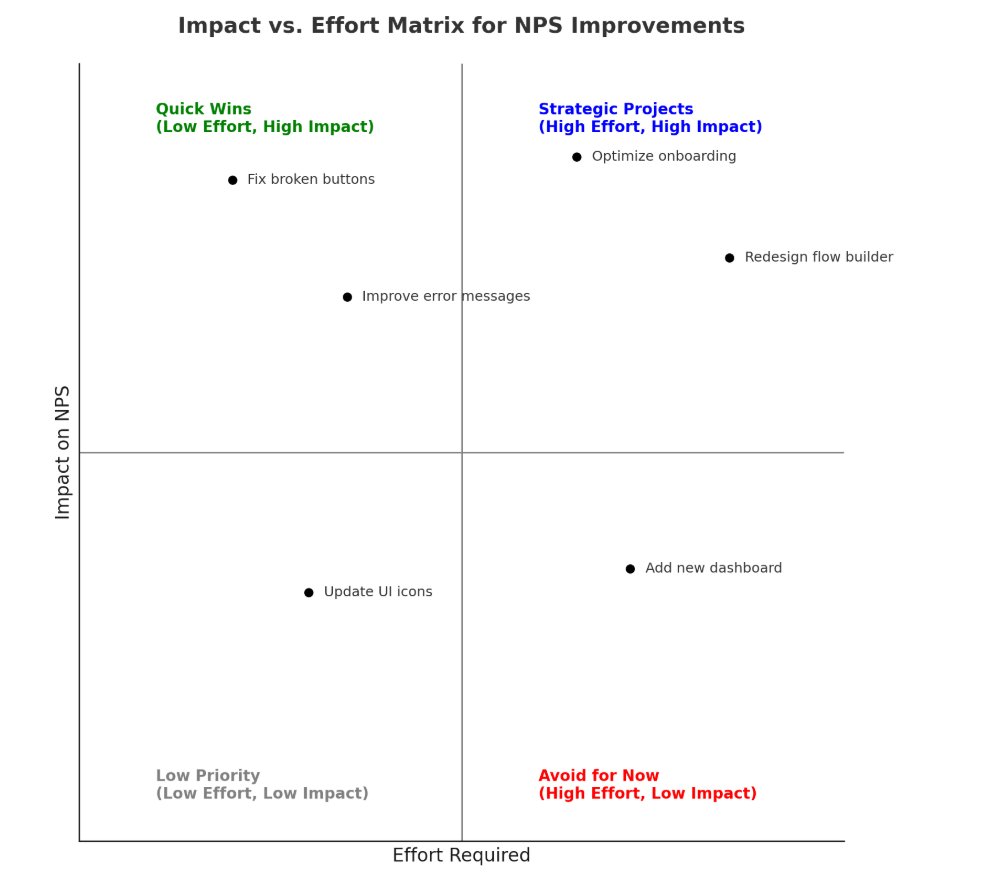
Image: Impact vs. Effort Matrix for NPS Improvements
These are often the quickest wins. In many cases, resolving just a handful of core usability issues yields noticeable improvements in user satisfaction. These improvements don’t come from adding features or redesigning the interface, but from restoring broken flows, fixing blockers, and making the product feel stable and usable again.
A Repeatable Loop to Improve NPS
Improving NPS is not a matter of guesswork. It requires a structured loop:
- Send NPS surveys after key interactions.
- Segment the results.
- Group feedback into clear themes.
- Validate with product data.
- Assign owners to fixes.
- Survey again and track results.
When followed consistently, this loop helps you catch friction early and measure the outcome of your changes. It builds a steady rhythm of feedback and iteration.
NPS Is a Signal, Not the Destination
NPS reflects how users feel in a given moment. It reveals the difference between how your product works and how users experience it. That insight can help you anticipate and address deeper problems.
The goal is not to chase a higher number. The goal is to listen, respond, and improve. Teams that succeed with NPS don’t treat it as a scoreboard. They treat it as a guide.
By embedding NPS into your product strategy, segmenting results, turning feedback into actionable themes, and closing the loop, your team can transform user insights into better experiences one fix at a time.
References:
- Abutouq, A. (2025, August) . Product NPS: How to collect, analyze, and act on Net Promoter Score data . Userpilot. https://userpilot.com/blog/product-nps/
- Berman, N. (2024, February) . Effective NPS implementation: A guide for SaaS companies . GetBeamer. https://www.getbeamer.com/blog/effective-nps-implementation-a-guide-for-saas-companies
- Fessenden, T. (2024, June) . Why NPS scores shouldn’t be used alone to measure UX . Nielsen Norman Group. https://www.nngroup.com/articles/nps-ux/
- Khandelwal, M. (2024, May). Product NPS – What it is and why it matters . SurveySensum. https://www.surveysensum.com/blog/product-nps
This story was originally published on May 20, 2024.
Featured Image: Net Promoter Score | Olivier Le Moal via Shutterstock
Enjoyed this article?
If TechLatest has helped you, consider supporting us with a one-time tip on Ko-fi. Every contribution keeps our work free and independent.
