
Today we take up the feature regarding the emerging messaging app ‘Telegram Messenger’. Telegram is bringing lots of new and helpful features giving a good competition to Facebook-owned Whatsapp.
It has bought features like secret chat, multiple profile photos, etc.
Don’t want to miss the best from TechLatest ? Set us as a preferred source in Google Search and make sure you never miss our latest.
Today we shall see the self destruct setting present in this app.
An active account is an account that has come online recently. If you have multiple accounts in your app, make sure to switch between them enough to have your status be “online” before reaching the time of your self-destruct setting. — Telegram Messenger (@telegram) August 27, 2019
Self destruct message app is already present in Telegram, where the message gets deleted after a fixed time.
But there is one more feature of ‘self destruct account’.
Self destruct account automatically clears your chart history and your account goes into the inactive state if you are not online even once in the default time.
The default time set by the server is 6 months.
So it requires you to visit once for 6 months so that your account won’t become inactive and you don’t lose your data.
There is also one method or setting under which you can increase the time limit.
Here is the process:
- Launch your Telegram app.
- Click on the three-line icon on the top left corner.
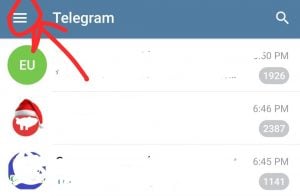
- You will see pop up screen.click on ‘Setting’.

- Under settings click on ‘privacy and security’.
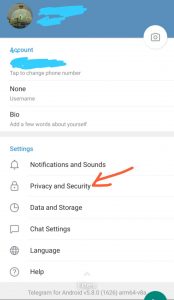
- Slide down where you find the option of ‘Delete my account if away for’, under the advanced setting.
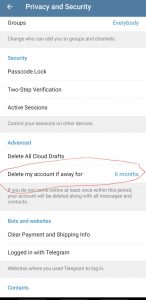
- Set it for 1 year.
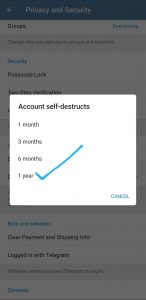
- Now you just need to visit once a year to make your account active.

These were the steps to make your account active, thus preventing your precious data.
Do comment if you have a query or any other feature which you want us to take up.
Happy Messaging………….
Enjoyed this article?
If TechLatest has helped you, consider supporting us with a one-time tip on Ko-fi. Every contribution keeps our work free and independent.
