Highlights
- Choosing the right wallpaper size ensures your iPhone screen appears sharp and clean, without any blur.
- Every iPhone model has its own ideal resolution, so matching the wallpaper to your model gives the best results.
- Using a wallpaper equal to or higher than your screen resolution ensures the image remains clear and crisp.
Changing wallpapers is one of the easiest ways to make your iPhone look fresh and unique. Some people like colorful wallpapers, some prefer minimal designs, and others use photos of family (I do the same), pets, or their favorite place.
But something many users don’t notice is that wallpapers don’t always fit the screen properly. Sometimes they look sharp and beautiful, and other times they look blurry, stretched, or cropped, or you just “feel something is not right.”
Don’t want to miss the best from TechLatest ? Set us as a preferred source in Google Search and make sure you never miss our latest.
This difference primarily occurs due to one factor: iPhone wallpaper size . So what exactly is your iPhone wallpaper size? Why does it matter so much? Let’s find out all your answers here in this guide. So, let’s get started without further ado.
Content Table
Why iPhone Wallpaper Size Matters More Than You Think
When you set a wallpaper, your iPhone tries to adjust the picture to your screen. If the wallpaper size doesn’t match the screen resolution, the phone stretches or shrinks the image. This causes problems like:
1. Blurriness
When the picture is smaller than your screen, the iPhone enlarges it. Enlarging makes pixels spread out, and the photo loses clarity.
2. Stretched Faces or Objects
If the wallpaper has a different shape (aspect ratio) than your screen, it stretches oddly. People look fat, buildings look long, and designs lose their natural shape.
3. Cropped Important Parts
Sometimes the wallpaper is too wide or too tall. Your iPhone cuts the extra parts to make it fit the screen. This removes faces, text, or important details from the image.
4. Notch or Dynamic Island Covering the Design
All modern iPhones from iPhone X to iPhone 16 have a notch or Dynamic Island. If the wallpaper isn’t designed for that shape, the main subject might get hidden behind it.
So wallpaper size affects more than just the “look,” it affects whether the image even makes sense on your screen.
What Exactly is iPhone Wallpaper Size?
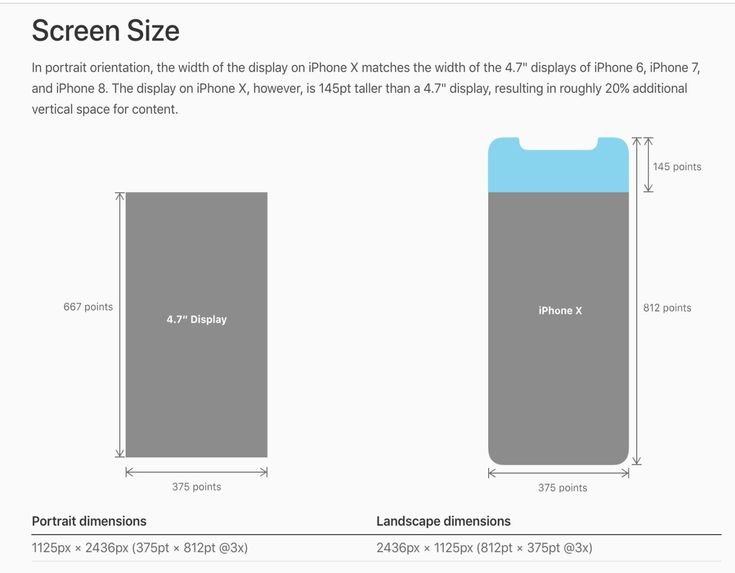
The wallpaper size simply means the recommended resolution (width × height in pixels) that perfectly matches your iPhone’s screen. Like, for example:
- iPhone 16 Pro Max wallpaper size → 2868 × 1320 pixels
- iPhone 14 Pro → 2556 × 1179 pixels
- iPhone 11 → 1792 × 828 pixels
Every iPhone has its own screen resolution. If your wallpaper has the same resolution or higher, it will look sharp, clean, and crisp.
Why Do Different iPhones Have Different Wallpaper Sizes?
iPhones come in many shapes and sizes. Some have small screens, some have big ones. Some have notches, some have Dynamic Island, and older iPhones have thick bezels with a Home button.
- iPhone 8 uses a 16:9 aspect ratio
- iPhone 11 uses 19.5:9
- Modern models like iPhone 15 and 16 use 19.5:9 , but in higher resolutions
- iPads use 4:3 , which is even more square
Because the screens are different, the wallpapers also need different sizes to match perfectly.
iPhone Wallpaper Size Table
Below is a simple table with the ideal wallpaper sizes for popular iPhone models.
If your model is in this list, you can simply pick the size and download wallpapers in that resolution.
How to Find the Perfect Wallpaper Size for Your iPhone (Step-by-Step)
Step 1: Find Your iPhone Model
You don’t need to remember your model number. Just check it:
- Open Settings , go to General , and tap About .
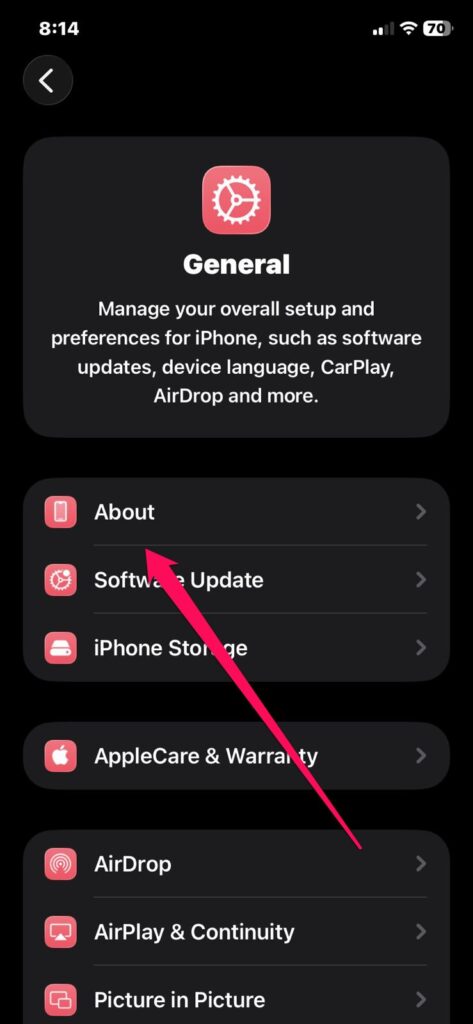
- Look at the Model Name
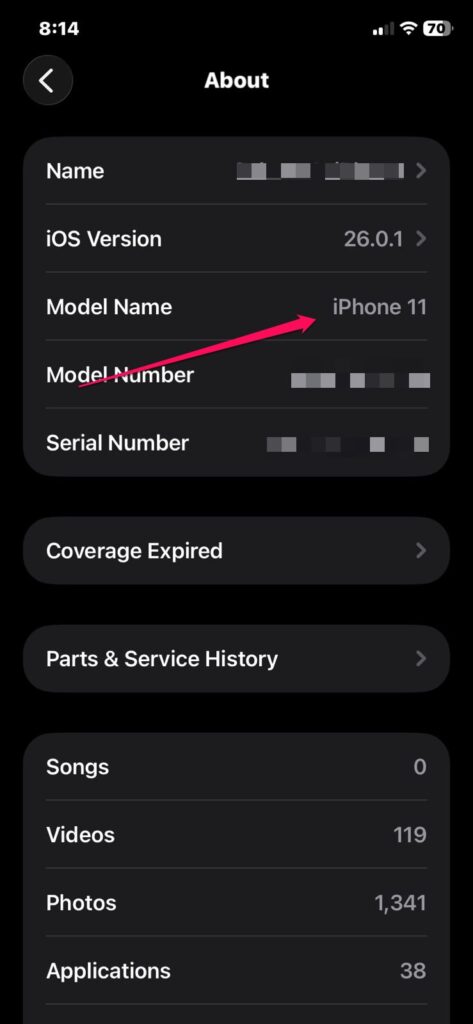
You will see something like:
- iPhone 12
- iPhone 14 Pro Max
- iPhone 11
That’s all you need.
Step 2: Match Your Model With the Table
Once you know your model, scroll to the table above and check the correct wallpaper size.
Step 3: Use Images With That Resolution
If you download wallpapers from the internet, look for the resolution in the description. Always choose wallpapers that match or exceed the recommended size.
- Higher size = sharper wallpaper
- Lower size = blurry wallpaper
Why Higher Resolution Wallpapers Look Better?
It’s always safe to use larger wallpapers. For example, if your phone uses 2556 × 1179px wallpaper, you can use a 4K wallpaper, and it will still look amazing. This is because:
- iPhone will shrink the image, not enlarge it
- Shrinking improves sharpness
- Larger images hold more detail
So, it’s totally fine if your wallpaper is bigger than your screen resolution.
What Are the Most Common Problems Users Face And Their Fixes?
Problem 1: My wallpaper looks blurry
Possible reasons:
- The wallpaper resolution is too low
- You downloaded a compressed image
- You zoomed the wallpaper while setting it
- The home screen blur effect is turned on
Fix: Use the exact wallpaper size from the table above and avoid zooming the image.
Problem 2: Wallpaper looks stretched
This happens when:
- The wallpaper is landscape
- or square
- or a wrong aspect ratio like 1:1
To Fix It: Always use a portrait wallpaper with an aspect ratio close to your phone’s ratio.
Problem 3: Notch or Dynamic Island hides the subject
If the main object (face, building, or logo) is in the top center of the image, the notch may hide it.
To Fix It: Use wallpapers with the subject lower in the frame.
Problem 4: Lock screen looks different from the home screen
The lock screen has depth effects, widgets, and clock placement.
To Fix It: Choose simple backgrounds for the lock screen and detailed ones for the home screen.
What About iPad Wallpaper Sizes?
iPads are different from iPhones. Their screens are more square.
Most iPads have a 4:3 aspect ratio, which means wallpapers must be wider.
- iPad Pro 13-inch > 2752 × 2064
- iPad Air > 2360 × 1640
- iPad Mini 6 > 2266 × 1488
Because of this difference, iPhone wallpapers do not fit well on iPads.
What are the file formats (PNG or JPG) you must choose?
Both work perfectly fine.
- JPG is smaller in size and loads faster
- PNG is heavier but sharper for graphics or patterns
For most wallpapers, JPG is enough.
Can You Use Any Photo as Wallpaper?
Yes, you can use:
- landscape photos
- square images
- random screenshots
- downloaded images
But the iPhone will crop or stretch them automatically. To avoid that, adjust the zoom manually when applying the wallpaper.
So, that’s all we have for you about the iPhone Wallpaper Size. We hope that this guide has helped you. For more info, comment below and let us know.
Enjoyed this article?
If TechLatest has helped you, consider supporting us with a one-time tip on Ko-fi. Every contribution keeps our work free and independent.
